


Lycos account - Folders - Urgent

Hi, I recently created an account on Thunderbird to save all my Lycos emails on my laptop, but Thunderbird is showing only Inbox & Trash folders under my Lycos email address and Trash & Outbox under Local Folders. There are other 4 folders, which are not visible. I want to see and save all my emails in Lycos email account. Please help. Awaiting your response. Best regards, Dreamz_147
Kiválasztott megoldás
When your problem is fixed, can you mark the topic as 'Solved' please? Thank you.
Válasz olvasása eredeti szövegkörnyezetben 👍 0Összes válasz (9)
Create the account in Thunderbird as IMAP and not POP.
You can Google the two protocols to see how they work and differ.
Thanks for your response. I don't remember which option I used during the installation. How can I check it and change it, if needed?
Go to Tools|Account Settings|<select account>|Server Settings and it tells you there.
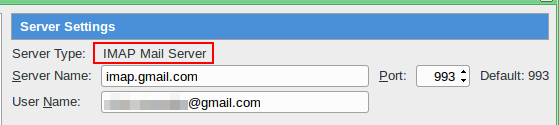
My missing folders are now visible. Now, I want to take a backup on my laptop ASAP. Please help. Your immediate response will be highly appreciated.
Módosította: dreamz_147,

You should turn on synchronization for your IMAP folders, so that Thunderbird downloads an offline copy of all your messages. https://support.mozilla.org/kb/imap-synchronization
Depending on the size of your email archive on the server this may take a while. You can check the progress using Avtivity Manager. Tools (Alt-T) - Activity Manager
Once the download completed create a full back of your Thunderbird profile. https://support.mozilla.org/kb/profiles-where-thunderbird-stores-user-data#w_backing-up-a-profile
Copied the whole Profile to another location on my laptop. Now, I want check to ensure that the copy contains the complete data. Please help.
There are tools which can compare source and destination folder. Google is your friend.
Thank you for your help.
Kiválasztott megoldás
When your problem is fixed, can you mark the topic as 'Solved' please? Thank you.