


If I download 40.0 and do not like it can I go back to 30.0 which I love?

If I download 40.0 and do not like it can I go back to 30.0 which I love? Is there a site that would allow me to download 30.0?
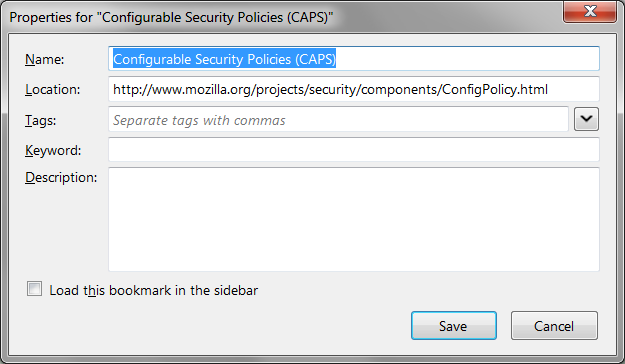
Please tell me if in 40.0 on my bookmark "properties" box is there still an area that I can leave notes?
ty
Összes válasz (3)
All of the old versions of Firefox are still available. However, for security reasons, you shouldn't try to stay on Firefox 31 forever or, if you do, please don't drive it on the public internet.
I'm not sure what you mean about notes. There is a large area called Description that you can write in in Firefox 40.0. (Screen shot attached.) Is that the one you mean?
A few other comments:
(1) You should be able to update from within Firefox using the Help or "?" menu > About Firefox
(2) Alternately, this page has full installers in any choice of language: https://www.mozilla.org/firefox/all/
(3) Your Question Details > More System Details shows an extra Flash plugin. You may need to delete that by hand. If you type or paste about:plugins in the address bar and press Enter to load that, you will get a page with extensive details on your plugins. You can use Find (Ctrl+f) to look for the Flash plugins and remove the older one (Flash 16) from the Path indicated.
You could consider to install the Firefox 38.2.0 ESR release. That way you will receive security updates.
Firefox 38.2.0 ESR: