


Impossible to add search engine in Firefox iOS

My device is localized to sweden and I get a failed entry every time i try to add a search engine (like DuckDuckGo or Bing). They are not in the list either. As for now Im stuck with safari since I dont want to use Google.
Any advice?
चुने गए समाधान
Try this way to add new search engine. check the attached image
संदर्भ में यह जवाब पढ़ें 👍 1All Replies (5)

Goto Firefox Settings -> Search Engine -> Choose "Duck Duck Go". So it changes the default search engine to "DuckDuckGo"
Not US/ENG so Duckduckgo is not on the list. Im trying to ad by query string but rhats doesnt seem to work.
With localized I mean not US/ENG so Duckduckgo is not on the list of available servh providers. Im trying to ad by query string but rhats doesnt seem to work
चयनित समाधान
Try this way to add new search engine. check the attached image
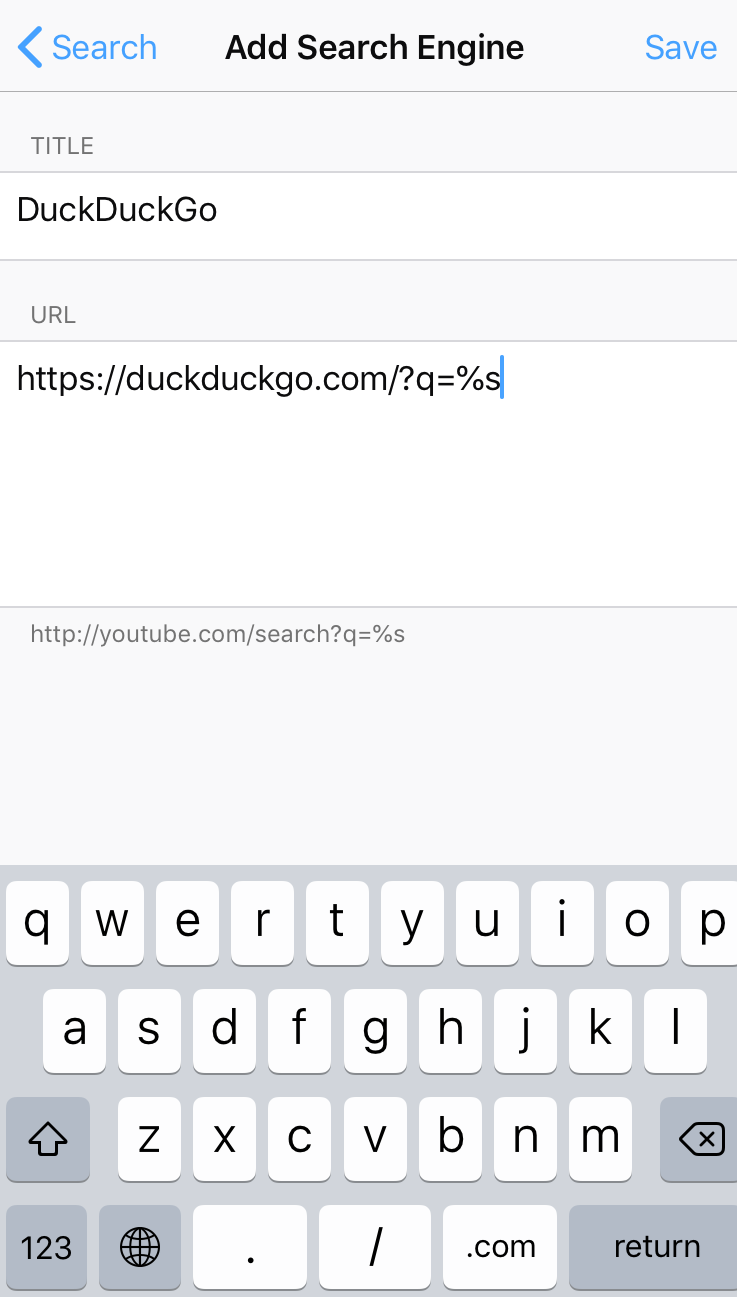
Perfect, turns out the name must be correct too, and case sensitive. Now it works, thanks!