


How to stop sites I visit from appearing with the shortcuts I've saved on my homepage? I can't find help anywhere

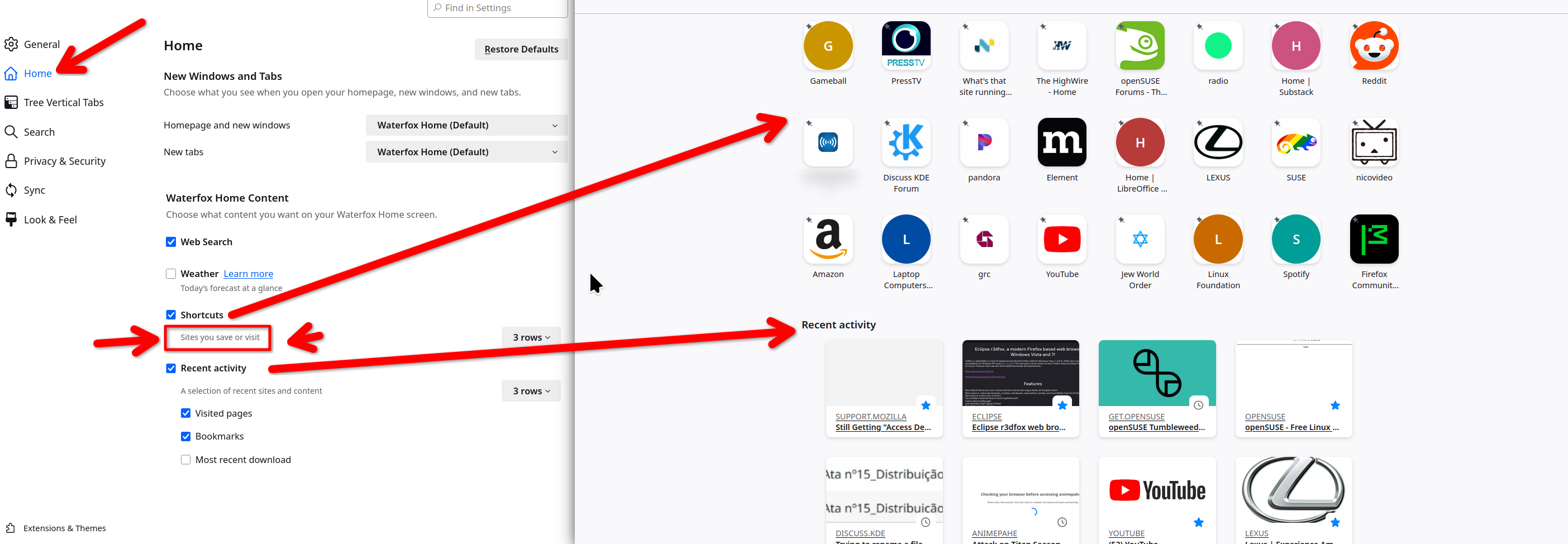
So whenever I visit a website, or websites, they get added up with my shortcuts on the homepage which gets really annoying because I have to manually dismiss them everytime. for instance, I've marked them with the green circles in the picture attached here. how do i stop them from appearing here?
All Replies (2)
For that you need to tweak you settings for the home page. I've filled up my shortcuts so that sites that I've visited and recent activity are not there. see screenshot

I even invented shortcuts to 127.0.0.1 just to fill up the shortcut bars on my home screen. No luck. Even when the 'add shortcut' button is gonedy-gone-gone, Firefox STILL decides to add a shortcut to a search result on a site I already have a shortcut for, of all things.
This question has been locked because the original author has deleted their account. While you can no longer post new replies, the existing content remains available for reference.