Processes

Hi, I have 30 Firefox processes running and they are taking up ~2700 MB (84%) memory. I have 8GB installed memory. I'm running Win 11. What causes processes to run and how do I know which ones I can end?
Any help is appreciated.
Thanks, John
All Replies (2)
Hello
https://support.mozilla.org/en-US/questions/1550474
You can try.
Task Manager - see whether tabs or extensions are slowing down. https://support.mozilla.org/en-US/kb/task-manager-tabs-or-extensions-are-slowing-firefox
Firefox Profiler. https://profiler.firefox.com
And, for information. https://support.mozilla.org/en-US/kb/use-troubleshooting-information-page-fix-firefox
Multiprocess Windows: This shows you the number of Multiprocess Firefox windows (if any) and the total number of windows that are open.
Multiprocess Windows 2/2 = 2 windows Multiprocess WIndows 3/3 = 3 windows
And so on ...
Info on what you're seeing in task manager.
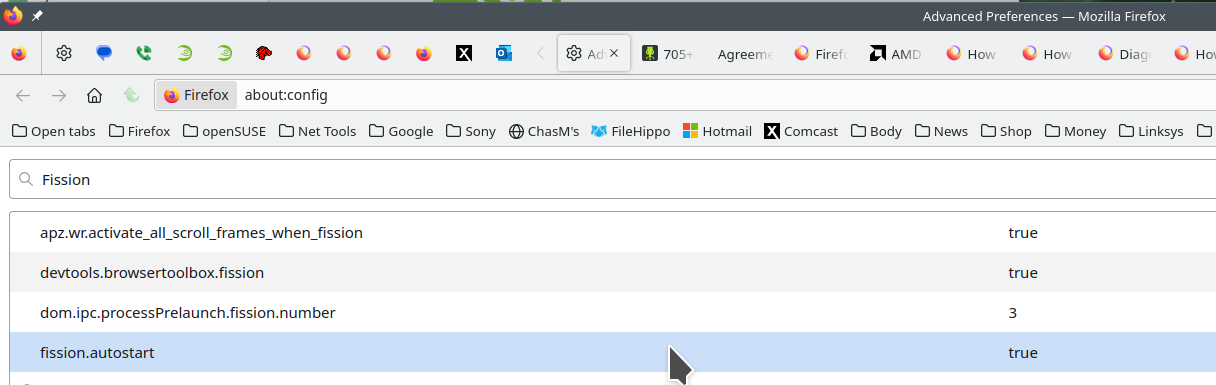
Introducing Firefox’s new Site Isolation Security Architecture https://hacks.mozilla.org/2021/05/introducing-firefox-new-site-isolation-security-architecture/
You can try Firefox's Site Isolation feature Fission in Nightly now https://www.ghacks.net/2020/09/20/you-can-try-firefoxs-site-isolation-feature-fission-in-nightly-now/
Firefox's Project Fission: better security and more processes https://www.ghacks.net/2019/02/07/firefoxs-project-fission-better-security-and-more-processes/
Change how many processes multi-process Firefox uses: see screenshot https://www.ghacks.net/2016/02/15/change-how-many-processes-multi-process-firefox-uses/