


How to disable transparency in sidebar?

I am using AIM Express in the sidebar and the text for usernames and chat is transparent to the point of blending into the background and becoming unreadable. Is there a way to disable transparency in the sidebar? Thank you.
Kaikki vastaukset (9)
Hello,
In order to better assist you with your issue please provide us with a screenshot. If you need help to create a screenshot, please see How do I create a screenshot of my problem?
Once you've done this, attach the saved screenshot file to your forum post by clicking the Browse... button below the Post your reply box. This will help us to visualize the problem.
Thank you!
Attached both sidebar image and normal image. Thank you!
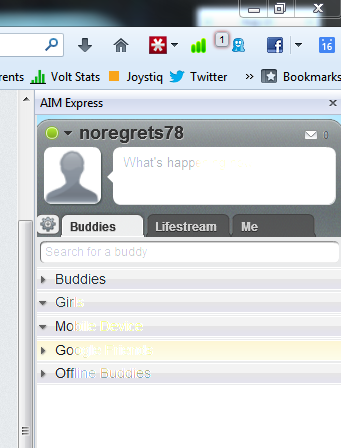
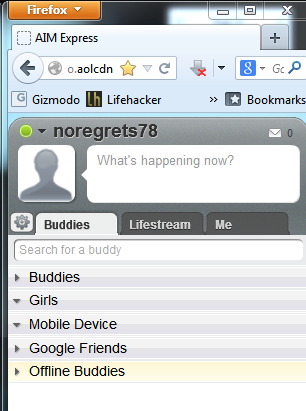
So the AIM toolbar is the problem? or the firefox window?
I am loading AIM Express in a sidebar. When I do that, the transparency shown in the attached image where you can't read the text clearly is the issue. When the AIM Express site is loaded in a regular Firefox window, all text is fully visible and there is no transparency. That is also attached.
Im not sure, may be their issue, but never know, follow the directions below.
Click the orange Firefox button at the top left, then select the "Options" button, or, if there is no Firefox button at the top, go to Tools > Options.
- In the Firefox options window click the Advanced tab, then select "General".
- In the settings list, you should find the Use hardware acceleration when available checkbox. Uncheck this checkbox.
- Now, restart Firefox and see if the problems persist.
Additionally, please check for updates for your graphics driver by following the steps mentioned in the following Knowledge base articles:
Tried the hardware acceleration, no change.
Driver for Asus HD7750 V2 up to date.
Can you reproduce in a new profile?
Yes. I created a new profile and was able to reproduce. In addition, I also have the same issue on a virtual machine that I use in my office. Whatever the background is, the text in the aim express sidebar window is transparent to show that color. The system I have at work I don't use wallpapers on so with the black background it's perfectly usable. The system I have at home is personalized with custom wallpaper that renders the text unreadable. I could switch to a black background but I'd rather not have to use that as a workaround.
I'm using WinXP so I don't know if any of the default Firefox sidebar views (bookmarks or history) have transparency, but that is something you can check for yourself. If they do, there might be some userChrome rules that can be applied to give you a solid / non-transparent background in the sidebar. If not, "someone" would have to "field-strip" that AIM Express add-on to see the css code used to give that panel that transparency, and then write a "rule" to counteract that provided css code. And since that AIM Express add-on doesn't seem to be available from the AMO website, that may complicate getting "someone" to help you by extracting the code used.
Note: An XPI "wrapper" is a "zip" type package which can be opened with a xip-utility program like 7-Zip. So if you can locate the XPI for that extension in your extensions folder of your Profile folder and open it, you can pick through the files and try to find the css code which is used for that "transparency". Post the code here and one of us should be able to help come up with the correct css code.