


Firefox 19 incompatible with latest Windows update

Running Firefox 19 and Vista/Windows 7.
My computer got one of those "critical Windows updates" and installed automatically. Afterwards it would not run Firefox. Firefox did not crash--it simply never started running in the first place. The most information I could get was that Firefox was now incompatible. Malwarebytes was able to connect to the internet, but not my browser. I did a system restore to before the update and it all works for now, but that's only a temporary fix.
Any ideas would be welcome.
Valittu ratkaisu
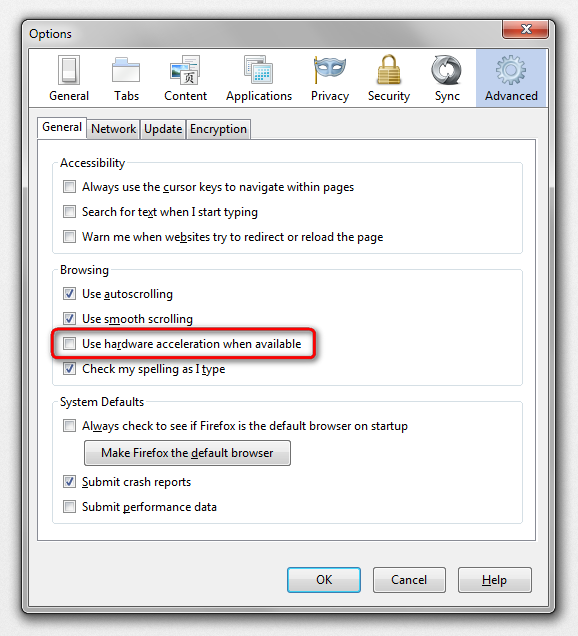
hello Catffs, please start firefox in safemode (by pressing the shift-key while it is launching) & go to firefox > options > advanced > general & disable hardware acceleration.
for some background on that issue you can also refer to bug #812683
Lue tämä vastaus kontekstissaan 👍 7Kaikki vastaukset (2)
Valittu ratkaisu
hello Catffs, please start firefox in safemode (by pressing the shift-key while it is launching) & go to firefox > options > advanced > general & disable hardware acceleration.
for some background on that issue you can also refer to bug #812683
Thanks very much!!