


How do I set which website will open when I open a new tab?

As of today, whenever I open a new tab, it brings me to a Bing search engine. Well, as well all know, Bing is garbage. I just want opening a new tab to open a blank page like it used to.
Valittu ratkaisu
Usually Firefox leaves a new tab blank. If Bing appears, you may have an add-on that is showing that page. You could check here:
orange Firefox button or Tools menu > Add-ons
On the left side, click Extensions. Anything Bing-related??
To have more control over your home page, you could try another add-on. For example, I've tested this one: NewTabURL :: Add-ons for Firefox.
Lue tämä vastaus kontekstissaan 👍 0Kaikki vastaukset (2)
Valittu ratkaisu
Usually Firefox leaves a new tab blank. If Bing appears, you may have an add-on that is showing that page. You could check here:
orange Firefox button or Tools menu > Add-ons
On the left side, click Extensions. Anything Bing-related??
To have more control over your home page, you could try another add-on. For example, I've tested this one: NewTabURL :: Add-ons for Firefox.
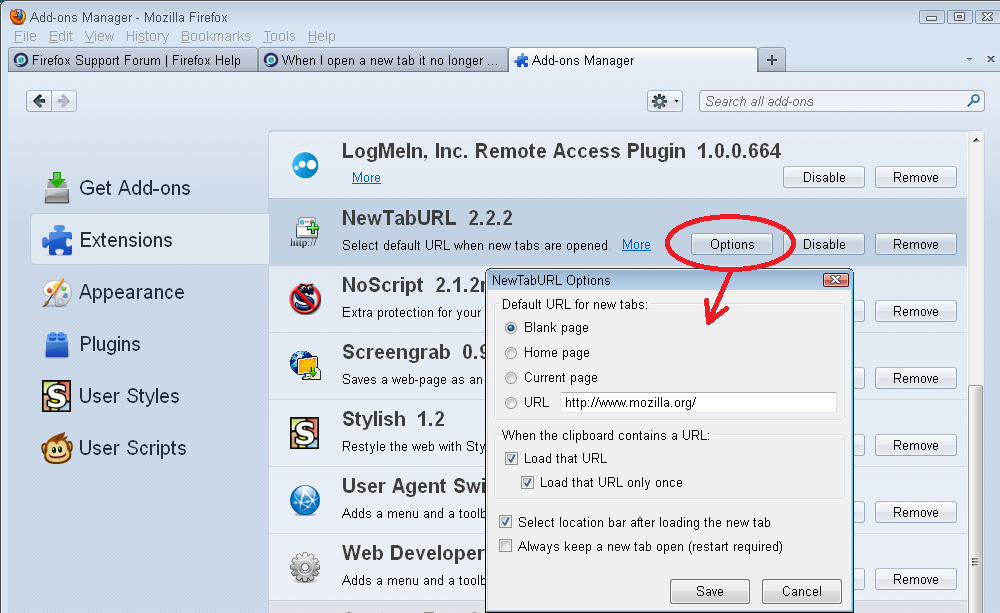
There was no add-on or extension causing the problem, but NewTabURL allowed me to set a blank page as the new tab page. Thank you for this suggestion :)