


Windows 10 reached EOS (end of support) on October 14, 2025. If you are on Windows 10, see this article.

Etsi tuesta

Avoid support scams. We will never ask you to call or text a phone number or share personal information. Please report suspicious activity using the “Report Abuse” option.

Lue lisää
Arkistoitu

Hardware key for password storage: form filling only works with certain URLs

righetti.daniele

Hello, I use a hardware key to store passwords (Hideez key). It has always worked correctly with the Firefox browser. Lately, only on some URLs, the key client does not correctly receive the domain of the active Firefox tab and therefore cannot find the correct credentials to enter.

Example 1: www.foo.com The client is able to retrieve the URL correctly and enters the credentials correctly.

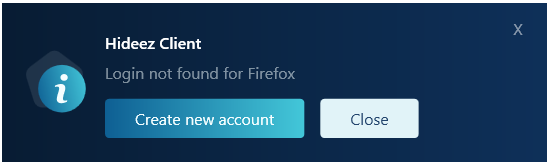
Example 2: www.google.com www.amazon.* Other URLs: The client does not retrieve the URL correctly but stops at the app level, as shown in the images.

Since the client works with other browsers even on the URLs in example 2, I assume there is some configuration in Firefox that needs to be changed. Can anyone help me? Thanks in advance. Best regards, Daniele
Hello, I use a hardware key to store passwords (Hideez key). It has always worked correctly with the Firefox browser. Lately, only on some URLs, the key client does not correctly receive the domain of the active Firefox tab and therefore cannot find the correct credentials to enter. Example 1: www.foo.com The client is able to retrieve the URL correctly and enters the credentials correctly. Example 2: www.google.com www.amazon.* Other URLs: The client does not retrieve the URL correctly but stops at the app level, as shown in the images. Since the client works with other browsers even on the URLs in example 2, I assume there is some configuration in Firefox that needs to be changed. Can anyone help me? Thanks in advance. Best regards, Daniele
Liitetyt ruutukaappaukset

Kaikki vastaukset (1)

In this section of the forum we speak Italian. For english support -> https://support.mozilla.org/en-US/questions/new/thunderbird/form