


Thunderbird gets emails from Ionos as letter salad

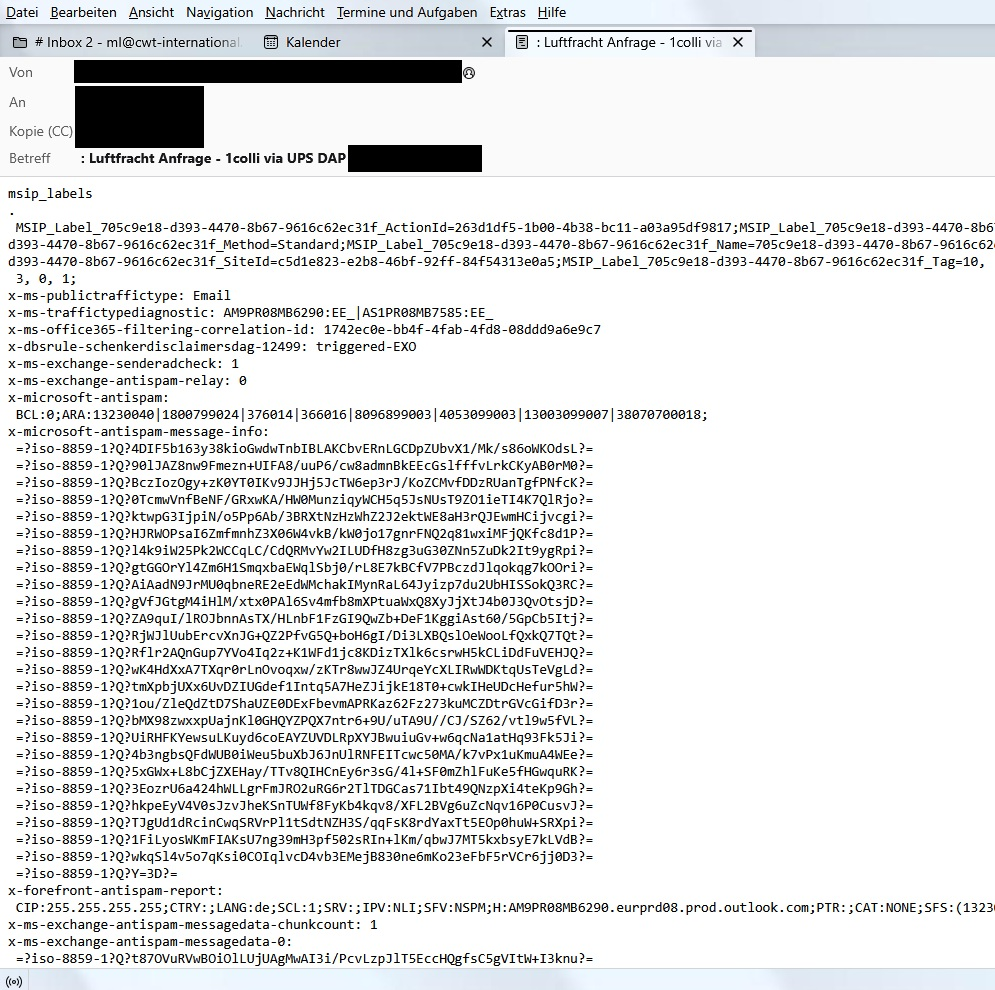
Hello Forum, since yesterday I receive some emails by thunderbird only as a letter salad.
Ionos claims that this is no ionos issue...
I am using thunderbird 141.0 on Windows 11. But The problem ocurred already on Windows 10. Not all Emails are shown wrong only a few from different countries and sender. I have already tried to repair my inbox, checked the size of inbox folder (5,5mb) and reinstalled thunderbird. I have the profile folder in a different path on a different hdd.
I am desperate... Can you help me?
Valittu ratkaisu
Finally it seems that these two settings had solved the problem! I really won't believe that the Antivirus really was the Problem lol :D Thank you for your help!
Lue tämä vastaus kontekstissaan 👍 0Kaikki vastaukset (3)

If you're using Bitdefender antivirus, it might be caused by that. Note that disabling only Bitdefender Antispam will not help. Try this, which may or may not work:
Open Bitdefender
- go to Protection > Online Threat Prevention > toggle off the 'Encrypted web scan' setting
New messages downloaded after that will hopefully be OK. However, old messages already downloaded to Thunderbird cannot be fixed. If old messages are still on your pop server, you can try downloading them again.
If you're using another antivirus, try disabling it and see what happens.
Hello Ed, I actually use bitdefender! I have turned the encrypted web scan off and will see if it will help. Nevertheless thank you in advance!
Muokattu , muokkaaja ml23
Valittu ratkaisu
Finally it seems that these two settings had solved the problem! I really won't believe that the Antivirus really was the Problem lol :D Thank you for your help!