

Ketju on arkistoitu.
Esitä kysymys, jos tarvitset apua.

Solved
Arkistoitu
All Folders Column Is Missing

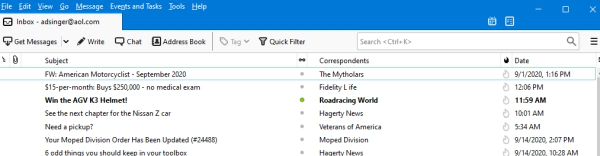
Running the latest version on W10. The column displaying my various emails and associated folders (trash, archive, etc.) is not displaying. Upon restarting Thunderbird, it flashes briefly then disappears. The inbox display above the menu bar lists only the primary email account, not the others, though their mail appears in the message pane. I have All folders selected and have tried many combinations of view changes. Attaching a screen shot of what I see.
Running the latest version on W10.
The column displaying my various emails and associated folders (trash, archive, etc.) is not displaying.
Upon restarting Thunderbird, it flashes briefly then disappears. The inbox display above the menu bar lists only the primary email account, not the others, though their mail appears in the message pane. I have All folders selected and have tried many combinations of view changes. Attaching a screen shot of what I see.
Kaikki vastaukset (2)
Valittu ratkaisu
Using top menu bar View > Layout > select 'Folder Pane'
Dar, that was easy, thought I'd tried every combination. Thanks.