Why does Firefox home page display past search arguments when I have "no history" set ?
I have Firefox set to not keep any browser history. I use Google as my default search engine.
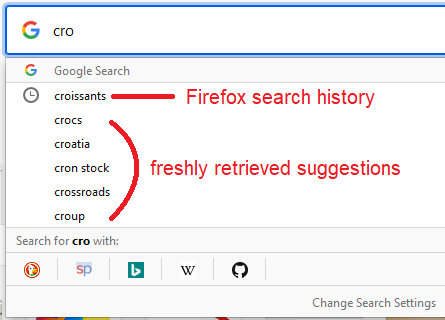
Using the Firefox Home page (about:home or about:newtab) and type a character (eg. "a") I get a list below of previous search arguments that I have used. If I go to Google and do the same I get a generic list of common searches beginning with "a".
Why does the Firefox home page display stuff that I don't want kept and how do I get Firefox to delete the information ?
Kaikki vastaukset (1)
Valittu ratkaisu
Hi leamphil, are you getting suggestions with the "clock" icon:

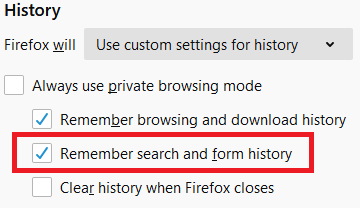
Those are from Firefox's Search and Form history, which can be enabled/disabled independently on the Options page, History section:

However, if you have set Firefox to "Never remember history" -- which is the same as "Always use private browsing mode" -- then I wouldn't expect search history to accumulate. Perhaps you need to clear old search history?