Thunderbird is not syncing sent emails to the server

When I send emails from Thunderbird, I cannot see them in the sent box in my other email clients - ie: outlook, iphone and ipad. Can anyone help me with the settings profile I need in Thunderbird to ensure messages sync with the server?
Kaikki vastaukset (3)
Thanks. I originally set the account up as POP however I have changed it to IMAP (per online instructions) however this has not helped. I dont want to delete the account and recreate it as I am afraid I will lose all my sent emails. Any other suggestions? Thanks
re :I originally set the account up as POP however I have changed it to IMAP (per online instructions)
You cannot simply change server settings of a pop account. So I presume you created a new mail account and set it up as IMAP. Please Confirm that you did this.
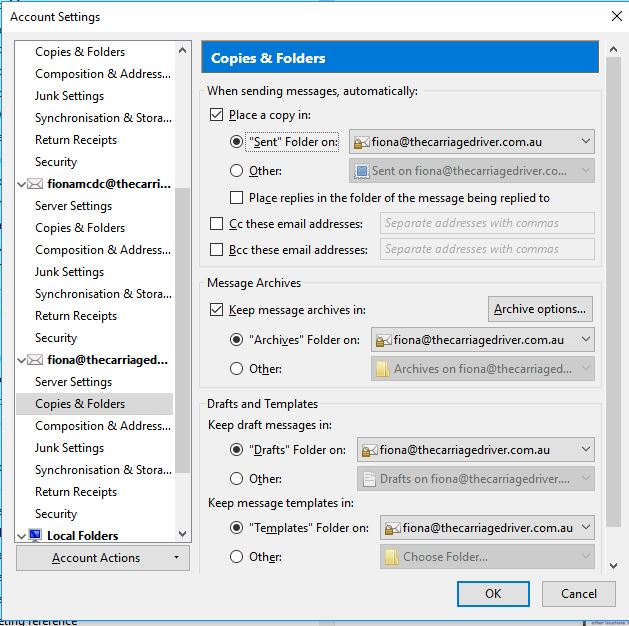
Have you subscribed to see the imap mail account server Sent folder ? In 'Account Settings' > 'Copies & Folders' for imap mail account, did you select to use that imap mail account Sent folder? For example: Select: 'Place a copy in' Select 'Other' and choose the subscribed Sent folder on the imap mail account
Hi, Thanks for your message. I thought I did have it set up correctly. I have attached a screenshot. Do you think this looks correct or do I need to change something?