


Is it possible to change the number of shown downloaded files?

When I click on the "Downloads" button, there are always only 3 most recent downloaded files shown in the list. Can I increase that number?
Valittu ratkaisu
If you want to download more at the same time, increase under about:config network.http.max-persistent-connections-per-server
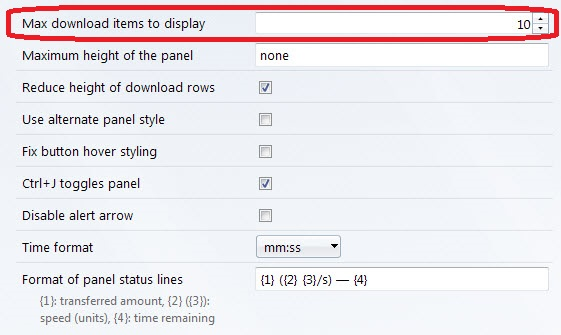
If you want to see more items that you have downloaded before, install this addon https://addons.mozilla.org/en-US/firefox/addon/download-panel-tweaks/?src=cb-dl-updated And change the first line into the amount you want to see (see picture)
Lue tämä vastaus kontekstissaan 👍 0Kaikki vastaukset (3)

Valittu ratkaisu
If you want to download more at the same time, increase under about:config network.http.max-persistent-connections-per-server
If you want to see more items that you have downloaded before, install this addon https://addons.mozilla.org/en-US/firefox/addon/download-panel-tweaks/?src=cb-dl-updated And change the first line into the amount you want to see (see picture)
Muokattu , muokkaaja MISTERAMD
Thank you!
The add-on "Download Panel Tweaks" is the thing I was looking for. It allows users to modify the height of download rows and width of the panel as well, which is great.
However it's a pity that all these useful options are not available in Firefox by default.
Muokattu , muokkaaja leon.slo
I'm glad that you are happy. :)