


URL bar popup menu text spaced out (kerning/tracking issue)

Hi All,
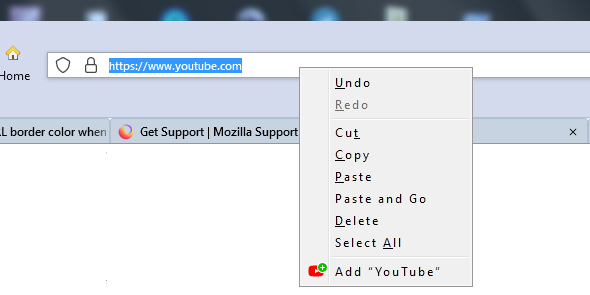
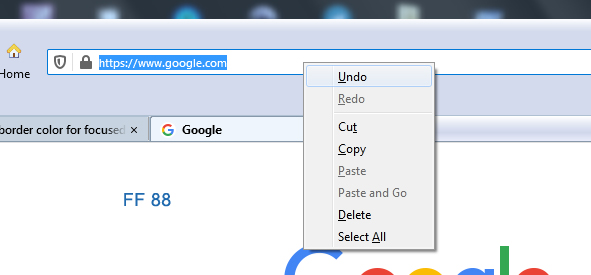
Is there any reason why the menu item text in the URL popup menu is so spaced out in FF 115 and 125?
It's the only menu I've found like that.
See attached screenshots. The one on the left is FF 115, and the one on the right is FF 88 (more normal).
Is there a way to fix this?
And also remove that "Add" menu item at the bottom?
If so, please reply!
Geändert am von Slouch
Ausgewählte Lösung
The line with the comment below was causing the extra spacing...
.urlbar-input-box {
   font-size: 11px !important;
   font-weight: 600 !important;
   letter-spacing: 2px !important;  /* this made the wide spaced menu */
}
The strange thing is, letter-spacing wasn't affecting the .urlbar-input-box as I intended, but the pop-up menu attached to it.
Go figure.
Diese Antwort im Kontext lesen 👍 0Alle Antworten (1)
Ausgewählte Lösung
The line with the comment below was causing the extra spacing...
.urlbar-input-box {
   font-size: 11px !important;
   font-weight: 600 !important;
   letter-spacing: 2px !important;  /* this made the wide spaced menu */
}
The strange thing is, letter-spacing wasn't affecting the .urlbar-input-box as I intended, but the pop-up menu attached to it.
Go figure.
Geändert am von Slouch