


I just updated to Firefox 6.0.2 and it is still freezing intermitantly. It lasts for 30-60 seconds. Before the update it froze intermitantly for more than 60 seconds. Help me unfreeze firefox!

Firefox will crash and say NOT RESPONDING at random. This happened when I updated to 6. I don't want to have to break into my system to make it work when Firefox 5 and under worked fine.
All Replies (61)
I have the problem and have DEFAULT theme and always have. It's not themes.
My problem is as follows: everything worked fine with my Firefox on all my computers. All of them were sync'ed with firefox sync (including my mobile).
Then, on my Windows 7 Home Premium 64-bit desktop (Q9450 CPU, 4Gb of RAM, Asus P5KC motherboard Intel P35-based), I replaced the motherboard and the CPU. Obviously I reinstalled Windows from scratch and Firefox as well. From plugins, I installed only Adblock plus with the Easylist and malwaredomains lists. The same plugin (along with others) were installed previously on my desktop. I initiated a new sync and my bookmarks and everything obviously appeared ok.
On this new hardware platform (Q9650 CPU, 8Gb RAM, Asus Rampage Extreme, Intel X48-based) I experienced strange freezes, which felt that they ranged from 10" to 30". These happen while I am trying to do an action, like fill in a form for example. Firefox does not freeze while it is idle. When this freeze takes place, it affects only firefox. Nothing else gets affected. Made a clean uninstall, re-installed with only adblock plus and enabled firefox sync. Same issue...
It drives my crazy because both the motherboard and the cpu are better than the one I used to have. The system is not overclocked. All my other firefox installations work perfectly.
I should add that I also tried checking with certain sqlite commands the integrity of all sqlite databases. All were ok. Additionally, I deleted this system from sync, completely uninstalled ff, deleted the relevant Application data subdirectories and made a fresh install, only with adblock plus and re-enabled sync. Same issue. Also tried using other memory DIMMs. Same thing again.
Atm, it feels like this is either motherboard related OR there is a "blocker" somewhere. What strikes me a lot is that it works perfectly on all my other computers (remember that all of them are firefox sync'ed) and that the problem appears on the strongest of these machines...
I've read some bug reports in bugzilla that *seem* to be similar to mine, but can't quite correlate the same. Then I stumbled an excellent process explorer from winternals (mentioned in this thread here as well), which you can get from http://technet.microsoft.com/en-us/sysinternals/bb896653
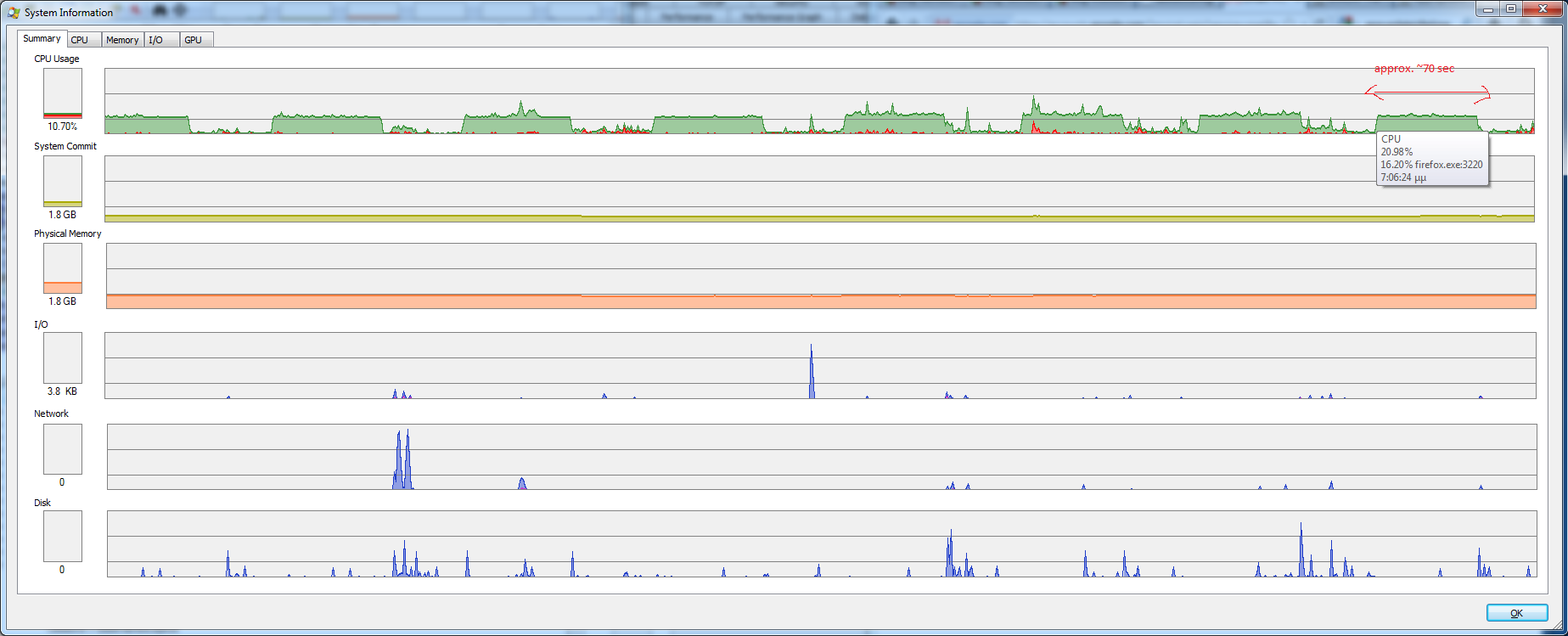
Running this process explorer along firefox I noticed that initially all seem fine. Selecting View -> System Information I watched what happened while browsing. Initially, browsing causes some small spikes. Then something *very* strange happens (see attached pic):
- Every 120" cpu load rises for approximately 60".
- During the 60" cpu peak, firefox exhibits the freezing
- firefox is ok during the rest (120-70=50") of the time only!
Note that this behaviour does not appear immediately at firefox start, but rather appears later on. I can not pinpoint the exact cause at this point. Once this 2 minute cycle starts, it does not stop until firefox exits!
Perhaps this should be submitted as a bug directly, but it felt like I had to gather some expert opinion here to help me and the devs on this. Some more info (in Greek, apologies): [code]
 Βασικά εφαρμογής
       Όνομα
       Firefox
       Έκδοση
       6.0.2
       User Agent
       Mozilla/5.0 (Windows NT 6.1; WOW64; rv:6.0.2) Gecko/20100101 Firefox/6.0.2
       Κατάλογος προφίλ
         Άνοιγμα φακέλου
       Ενεργές πρόσθετες λειτουργίες
         about:plugins
       Build Configuration
         about:buildconfig
 Επεκτάσεις
       Όνομα
       Έκδοση
       Ενεργές
       ID
       Adblock Plus
       1.3.9
       true
       {d10d0bf8-f5b5-c8b4-a8b2-2b9879e08c5d}
       Java Console
       6.0.27
       false
       {CAFEEFAC-0016-0000-0027-ABCDEFFEDCBA}
 Τροποποιημένες προτιμήσεις
     Όνομα
     Τιμή
       accessibility.typeaheadfind
       true
       browser.places.smartBookmarksVersion
       2
       browser.startup.homepage_override.buildID
       20110902133214
       browser.startup.homepage_override.mstone
       rv:6.0.2
       browser.tabs.warnOnClose
       false
       extensions.lastAppVersion
       6.0.2
       network.cookie.prefsMigrated
       true
       places.history.expiration.transient_current_max_pages
       257672
       privacy.sanitize.migrateFx3Prefs
       true
       security.warn_viewing_mixed
       false
 Γραφικά
       Περιγραφή προσαρμογέα
       NVIDIA GeForce GTX 560 Ti
       ID Κατασκευαστή
       10de
       ID συσκευής
       1200
       RAM προσαρμογέα
       1024
       Οδηγοί προσαρμογέα
       nvd3dumx,nvwgf2umx,nvwgf2umx nvd3dum,nvwgf2um,nvwgf2um
       Έκδοση οδηγού
       8.17.12.8026
       Ημερομηνία οδηγού
       8-3-2011
       Direct2D ενεργό
       true
       DirectWrite ενεργό
       true (6.1.7601.17514)
       Παράμετροι ClearType
       Οι παράμετροι ClearType δεν βρέθηκαν
       WebGL Renderer
       Google Inc. -- ANGLE -- OpenGL ES 2.0 (ANGLE 0.0.0.686)
       Επιτάχυνση γραφικών GPU
       1/1 Direct3D 10
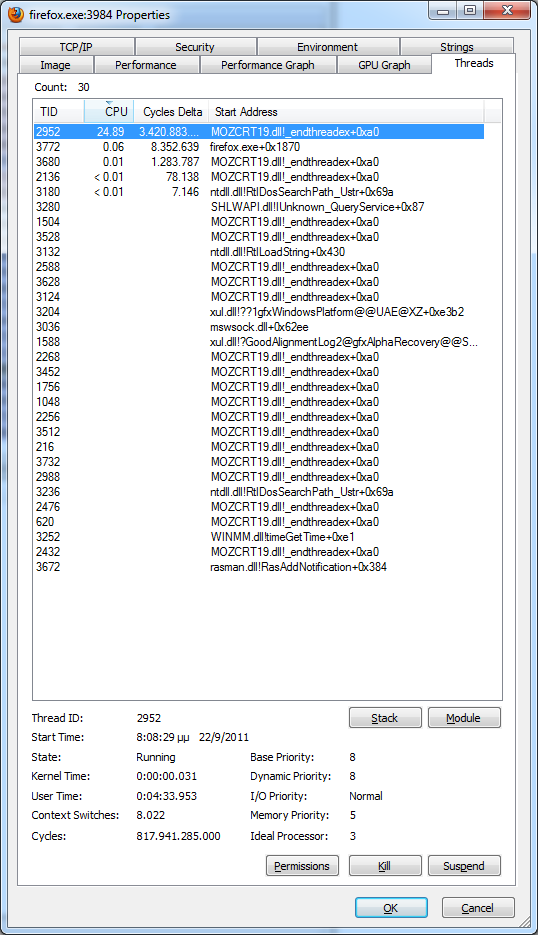
EDIT: Updated info. From sysinternals, I can see that when the 60" peaks take place, cpu time is dominated by thread MOZCRT19.DLL (see 2nd screenshot). During that time, the following seem to be causing the peak:
mozsqlite3.dll!sqlite3_reset+0x2db1 mozsqlite3.dll!sqlite3_step+0xd9 xul.dll!?CanUseOpaqueSurface@Layer@layers@mozilla@@QAEHXZ+0x1d81 xul.dll!?CanUseOpaqueSurface@Layer@layers@mozilla@@QAEHXZ+0x1c58 xul.dll!?CanUseOpaqueSurface@Layer@layers@mozilla@@QAEHXZ+0x1bc6 xul.dll!NS_GetXPTCallStub_P+0xb59 xul.dll!?IsOriginalCharSkipped@gfxSkipCharsIterator@@QBEHPAH@Z+0x28f9a xul.dll!?GetEffectiveClipRect@Layer@layers@mozilla@@QAEPBUnsIntRect@@XZ+0x659 MOZCRT19.dll!_endthreadex+0x78 MOZCRT19.dll!_endthreadex+0x106 ntdll.dll!RtlInitializeExceptionChain+0x63 ntdll.dll!RtlInitializeExceptionChain+0x36
Modified by Michail Pappas
Hi carmik,
May I suggest you start your own question, providing full information, hopefully someone will reply. (If relevant it is easy to provide cross links between threads)
We really need to know full details of your own problem, not just similarities with others.
@steve_in_srq: Seems like we are having similar, if not exactly the same, problem! I have opened bug 688521 on bugzilla for this( https://bugzilla.mozilla.org/show_bug.cgi?id=688521 ), would you care to add there to the troubleshooting? If possible, add details of your hardware platform, especially graphics and drivers.
@John99: there is a strong correlation with the issue of steve_in_srq. The freeze occurs on the same point (sqlite3-related). I have no intention of thread-hijacking here, trust me :)
Modified by Michail Pappas
Hi Carmik,
Sorry I was not suggesting you were thread hijacking, just the opposite, because you are providing so much detail I thought your own specific thread may have been more appropriate.
May I ask what you mean in your bug when you say
All my other firefox installations work perfectly.
Are you talking about on other machines; or firefox installations on the same machine ?
May I suggest in your bug you try recreating this problem
- in safe mode
- with all plugins uninstalled
or all except a named plugin, if for instance the problem is only seen with say FlashPlayer - with tabs opened only on named sites
- with the latest nightly
otherwise developers may doubt the problem still exists and may not investigate it
I guess there are multiple threads on this subject. Another one is here: https://support.mozilla.com/en-US/questions/869827?s=%28not+responding%29&as=s - but there seem to be no useful answers there, just user guesses that failed to help. This freezing is extremely frustrating. I tried disabling everything, reinstalling, etc, etc., freezes repeat every 5-6 minutes and go on for 30+ seconds. Judging from hundreds of users who clicked on "I am having the same problem" in these threads, this is pretty massive, and clearly it is something in Firefox that is causing it. Is there any investigation going on at Mozilla?
For me (who originally started this particular thread), it was resolved by choosing the default theme. I tried everything and nothing worked until I switched to the default theme. Now I have had no problems. I just hope that Firefox fixes these issues, otherwise it will go the way of Netscape. Netscape was awesome until it became bloat-ware offering too many options and poor support.
I had the default theme, didn't matter.
This solution has worked for me: Export bookmarks into HTML, exit Firefox, Remove profile, uninstall Firefox completely, install 3.6, immediately go to Options->Advanced->Update, and disable automatic update. Reinstall favorite add ons, import bookmarks. End of the 6.x curse.
The problems with downgrading to Firefox 3.6 are threefold
- it may not be supported for too much longer, and will then become insecure
- new features are being added to firefox all the time, you will not benefit from those
- the downgrade may well not solve your problem, it depends on exactly what causes any original problem
If you do downgrade to Firefox 3.6 I would recommend leaving automatic upgrades enabled. Currently Firefox 3.6 does not attempt to upgrade to later versions such as Firefox 6 or 7 (or at least not unless you specifically take that option) but it does make security upgrades to minor versions, so for instance 3.6.16 will update to 3.6.22.
Unfortunately the problem of freezes may well have more than one single cause. Firefox is very customisable, many users will add themes, add-ons and plugins, and obviously use any of a vast combination of sites.
It may often be a good idea to start your own thread and detail your own problems your troubleshooting efforts. You can always cross post a link into another thread if you think it is appropriate and the problem or solution could be of interest to readers of that other thread.
@John99: I have firefox installed on 3 desktop systems and on my mobile. All of them are Firefox sync'ed (bookmarks, passwords, history, tabs). By "All my other firefox installations work perfectly." I meant that 3 of my 4 systems operate without a hitch. This problem appears on the 4th systems, which happens to be the the most powerful and the one having the smallest number of extensions installed.
I have tried safe mode, disabled plugins, disabled graphics acceleration. No go.
From the posters in this thread, steve_in_srq appears to be experiencing the exact issue as I do.
I have opened bug report 688521 (see https://bugzilla.mozilla.org/show_bug.cgi?id=688521 ) for this issue.
After opening the bug report, I bumped upon the excellent "process monitor" application by Sysinternals. Having it run alongside firefox, I noticed that the freeze start coincided with two lock/unlock operations, on file places.sqlite-shm:
- The first, was a LockFile operation (exclusive: false, offset: 123, length: 1, fail immediately:true) thas was succesful
- The second was an UnlockFileSingle operation (Offset: 123, Length: 1) that was also successful.
Then, firefox does nothing for approximately 39". As far as cpu load is concerned, during these 39" cpu load rises to 100% with firefox being the dominating process. Specifically the mozsqlite thread. Things return to normal coinciding with an UnlockFileSingle operation for the same file and for the same offset:
- UnlockFileSingle (offset: 123, length: 1) success.
Really hope someone can try process explorer/monitor and perhaps confirm my findings...
I hope others can help, but I have only Windows XP 32 bit systems and do not suffer from these freezes. Is the problem machine the only 64 bit system ?
As a workaround and an experiment it may be worth trying installing a 32 bit version of firefox on the 64 bit machine, you could do it as a custom install, and with its own profile, as an additional installed version of Firefox. edit I was thinking a Windows 64bit version of Firefox is already out, apparently it is not, other than as trial versions
It may be interesting to discover how many users with a freeze problem are using 64 bit machines.
Modified by John99
I use Win 7 64.
I have a 64 bit machine.
The answer is to forget about this new version. I've just downgraded to 3.6.22 and there are no memory leaks. Works just as good. See OLDVERSION
Mine was freezing every 5-10 minutes. Firefox would run 1 core 100% and lock up for 10-20 seconds. It started with 6.01 and seemed to get even worse with 6.02.
I decided to upgrade to 7 beta since FF had become almost completely unusable. After half a day of use the problem seems to be gone.
I'm so frustrated! All day I have been disabling and updating add ons and plugins, clearing cookies trying to make this freezing stop. I don't have many add ons and I don't use themes. I'm on a MBA OSX 10.6.8.
Every time it freezes I have to force quit. How do I go back to the old version? Where can I find it? It's annoying because I want to sync with my mobile, which you can only do with this version, right?
Using an earlier version usually does not help with memory problems or afaik with problems of freezes. (With possible exception of some regressions on Firefox 4 but that is no longer supported and so largely irrelevant.)
Using Firefox sync is not limited to use of the current Firefox Release, see for instance:
- https://support.mozilla.com/en-US/kb/what-firefox-sync#os=mac&browser=fx35
(that deals specifically with Firefox 3.6 and Mac OSX)- general link is what is firefox sync
> Using an earlier version usually does not help with memory problems or afaik with problems of freezes.
Heh. It may not _usually_ solve it, but it sure solves it this time.
upgrade to 7 beta as you say lord sandwich. works well, no freezing or delays. java and a couple others not supported yet though