アーカイブフォルダのアイコン切替

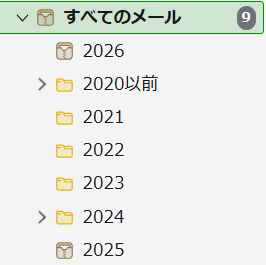
アーカイブしたメールの保存先のフォルダーを切り替えました。 新フォルダーと旧フォルダーのどちらも,アイコンがボックス型となっております。 旧フォルダーは通常のフォルダーアイコンに戻したいです。 どうすればいいでしょうか。
なお,GmailからIMAPで同期しています。
I’ve changed the folder where archived emails are saved. Both the new folder and the old folder now have box-shaped icons. I’d like to revert the old folder to the standard folder icon. How can I do that?
Note: I’m syncing via IMAP from Gmail.
アーカイブしたメールの保存先のフォルダーを切り替えました。
新フォルダーと旧フォルダーのどちらも,アイコンがボックス型となっております。
旧フォルダーは通常のフォルダーアイコンに戻したいです。
どうすればいいでしょうか。
なお,GmailからIMAPで同期しています。
I’ve changed the folder where archived emails are saved.
Both the new folder and the old folder now have box-shaped icons.
I’d like to revert the old folder to the standard folder icon.
How can I do that?
Note: I’m syncing via IMAP from Gmail.