


When I click on 'more' dots to save an article to Pocket 'save to pocket' is not a choice + Pinterest

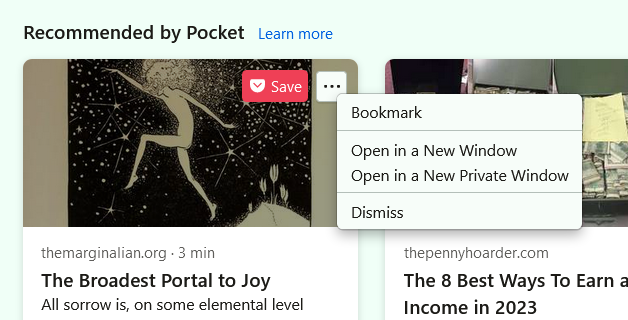
I have a premium Pocket account. I have pocket set to display suggested articles on the Firefox 'home page'. Out of the blue several weeks ago I clicked on 'more' to save an article to pocket and the pocket choices did not include 'save to pocket.' The choices given are: bookmark, open in a new window, open in a new private window, dismiss. Also when I move the cursor to 'more' a pinterest 'save' appears beside 'more'. I used to have the pinterest 'save' extension but I deleted it.
How do I get rid of the pinterest save and how can I get the correct 'more' choices, i.e. save to pocket back?
I've done everything I know to do and nothing has worked. At present I am right clicking on the articles I would have saved to pocket (each article to a new tab) and then I use the One Tab extension to save them in a group. I have attached a screenshot.
Thank you in advance for any help you can give me.
被采纳的解决方案
When I hover over any of the "Recommended by Pocket" articles and click on the "Save" button that shows up, I see a message "Saved to Pocket". The icon beside the "Save" button is Pocket's logo so this button works as intended (saves an article to Pocket), Pinterest's logo has a "P" in it.
I have attached a screenshot of what I see when I click on Save. Is it not the same for you?
定位到答案原位置 👍 0所有回复 (2)

选择的解决方案
When I hover over any of the "Recommended by Pocket" articles and click on the "Save" button that shows up, I see a message "Saved to Pocket". The icon beside the "Save" button is Pocket's logo so this button works as intended (saves an article to Pocket), Pinterest's logo has a "P" in it.
I have attached a screenshot of what I see when I click on Save. Is it not the same for you?

Thank you for your reply!