


avi or wmv files wont automatically save (tick box option is not selectable)

avi or wmv files wont automatically save (tick box option is not selectable)
i go to options and select SAVE as the default for .avi and .wmv
FF always asks me what to do every time? if i click save, the tick box option for 'always do this' is not selectable ?
How do i fix this so i can automatically download .avi and .wmv?
ie ........i click a link ..........it downloads......like other file types
Сви одговори (4)
See the other answer
Измењено од стране Zagros7000
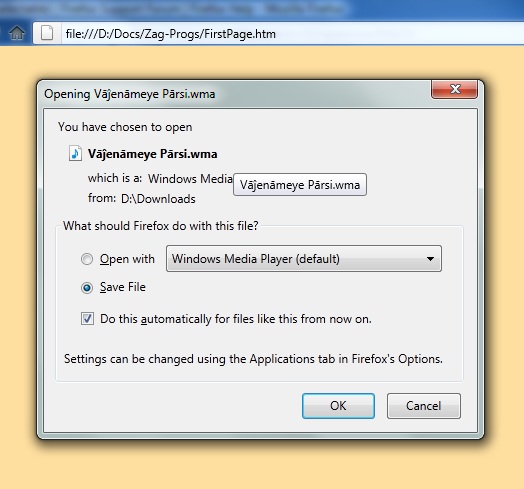
Try this: It works for ALL types of files!
- Save a small avi file on your harddisk
- Open Firefox
- Go to File | Open File ...
- Go to the file location and select it
- Click Open
- Now you see the small window named Opening …
- Click radio button Save
- Tick box “Do this automatically for files like this from now on.
- Piruz bāshid!
Измењено од стране Zagros7000
its a great idea but this solution only opens the file in the VLC player.
-- when i download: i select "SAVE" for .avi and .wmv wmv file type is not in the firefox options
FF always asks me what to do every time? if i click save, the tick box option for 'always do this' is not selectable ?
something to do with MIME extensions?
Maybe. Does it happen on every website delivering AVI or WMV files? If not, it could be the website which fails to send the right MIME type. So FF opens the dialog box instead of downloading the file and calling the associated software.
Измењено од стране Oxylatium