


Failed to run Firefox in headless mode under Ubuntu
Anyone succeed with running Firefox in headless mode under Ubuntu?
I tried:
firefox --headless --safe-mode -P headless https://quan.hoabinh.vn
but got this error:
[12545] Sandbox: CanCreateUserNamespace() unshare(CLONE_NEWPID): EPERM
- You are running in headless mode.
[GFX1-]: RenderCompositorSWGL failed mapping default framebuffer, no dt
I installed Firefox as from "https://packages.mozilla.org/apt" repo.
Сви одговори (11)
Tried:
firefox --headless --safe-mode --profile ~/.mozilla/firefox-headless/ h ttps://quan.hoabinh.vn
but still not work.
And how do you recognize "not work"? Did the URL not get requested (probably telling by server logs)?
According to bugzilla.mozilla.org/1693011 the RenderCompositorSWGL log is expected to be printed; however it's not related to functioning or not. The browser says "You are running in headless mode." so you probably are?
Yes, I checked the Nginx logs on the server and did not see the requests. Also, tried with `--screenshot /tmp/screenshots/`, not see any files created in "/tmp/screenshots/".
And the profile is otherwise able to launch, remembers its settings between restarts from this path etc. when you run it repeatedly as:
firefox --profile ~/.mozilla/firefox-headless/ --no-remote --new-instance
and it's not getting stuck on some onboarding and similar?
Yes, this command
``` firefox --profile ~/.mozilla/firefox-headless/ --no-remote --new-instance ```
seems to remember its settings when I run repeatedly.

Since the profile launches normally and remembers its settings, have you tried running the same command with --headless added to that working profile command and checking whether the request then appears in the Nginx logs?
Hmh this works as expected on Darwin:
firefox --profile ~/tmp --no-remote --new-instance --headless --screenshot ~/tmp.png https://example.net
but I tried Ubuntu in CI (where we normally use Xvfb) and I don't see the file there: github.com/janbrasna/kitsune/actions/runs/31789959250/job/94734405121#step:2:10 — however checking logs the site got hit anyway, so YMMV:
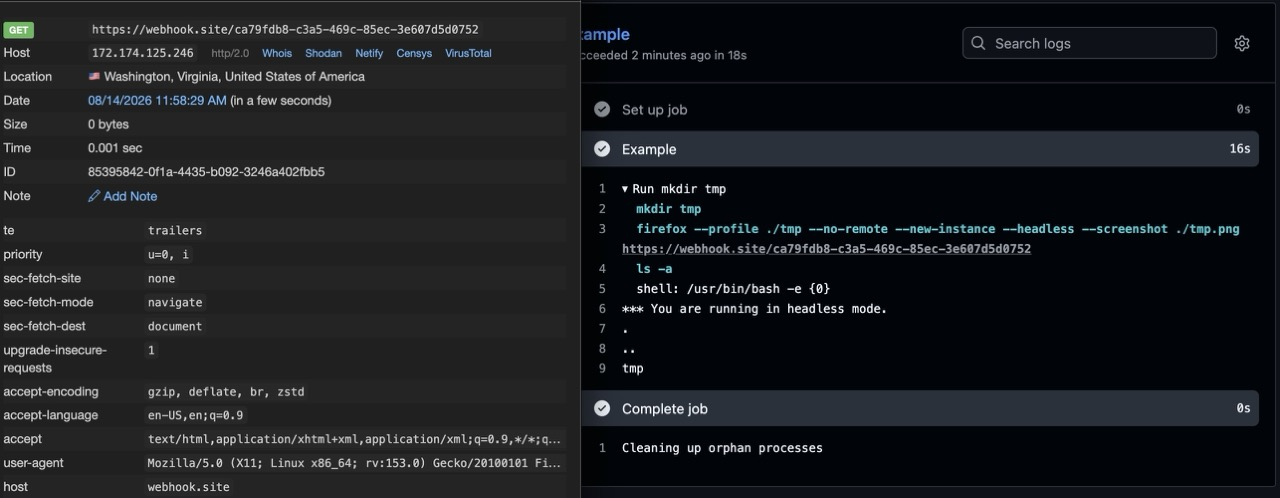
@Mehmood
Added `--headless`
``` firefox --profile ~/.mozilla/firefox-headless/ --no-remote --new-instance --headless https://quan.hoabinh.vn ```
still not make a visit to my site.
a) Do you need the (a, any, this, this exact) profile or its specific data?
(If not, depending on your usecase, could you run it from a profile not used by any other instance anywhere else? E.g. if this is to be ephemeral, ideally from a junk folder and wipe it afterwards? In my case I tried just a mkdir ~/here … firefox --[] … rm ~/here — to not persist anything and launch in isolation — tested on Ubuntu 24 with PPA repo install.)
b) Can you ping some webhook site instead to see the logs there?
The `--profile ~/.mozilla/firefox-headless/` is empty and for this headless attempt. It is not used by any other Firefox instance. I do not know any webhook site to test. For PPA, do you mean this one: https://launchpad.net/~mozillateam/+archive/ubuntu/ppa/?field.series_filter=resolute I will try it.
Now you do: https://docs.webhook.site/#what-is-webhooksite
Yes, that's the PPA — I'm not saying to use it instead, just that it's the version where the machine I used to run this above installs it from (I do not prefer it, but wasn't able to have the image moved off of the Canonical repo to Mozilla official one instead…). Otherwise it was completely clean setup, no onboardings confirmed etc., so there shouldn't be a "catch". For automation it's usually advised to use WebDriver (marionette, playwright/puppeteer kind of use case) as that sets some "recommended" prefs to not get in the way, but as mentioned earlier, this seemed to work even from a clean slate.
(I just wouldn't place ephemeral profiles under the usual profile folder, most people do that in tmp and similar.)