


Open
Unable to turn on VPN. I can only access the "Get Started" button

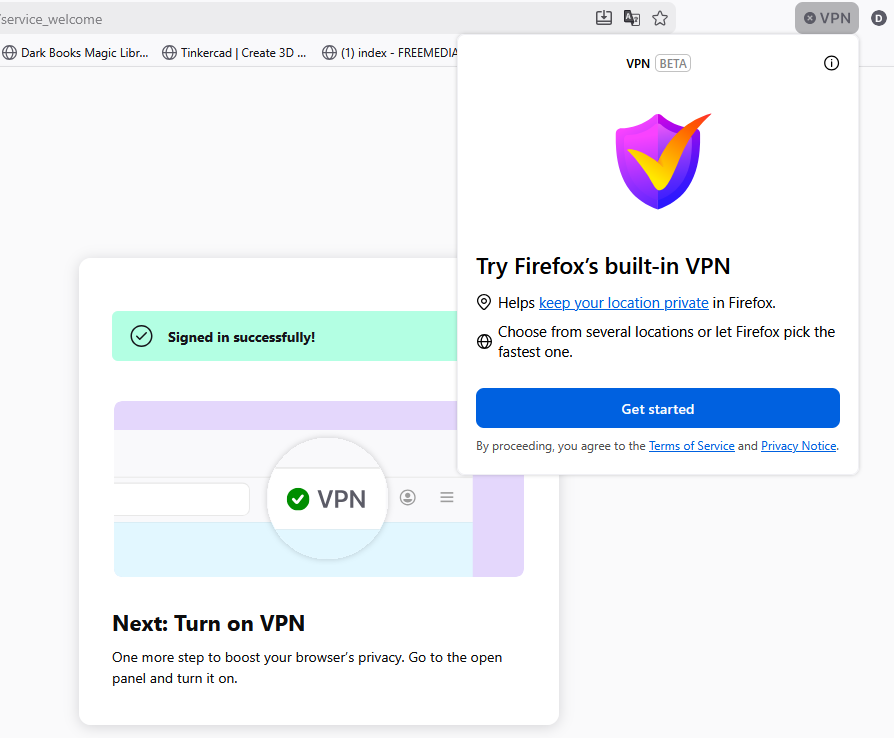
Hello. I have been trying to use the Firefox built-in VPN. I click on the VPN icon, click "get started" and it asks if I would like to continue with my Mozilla account. I click "Continue" and it says I am signed in and to click the VPN icon again to turn on the VPN. When I click the VPN again, it does not give me the option to turn it on. It only shows the "Get Started" button again and starts the process over. (see attached image)
Hello. I have been trying to use the Firefox built-in VPN. I click on the VPN icon, click "get started" and it asks if I would like to continue with my Mozilla account. I click "Continue" and it says I am signed in and to click the VPN icon again to turn on the VPN. When I click the VPN again, it does not give me the option to turn it on. It only shows the "Get Started" button again and starts the process over. (see attached image)
Сви одговори (1)
Hello
A similar issue https://support.mozilla.org/en-US/questions/1590569