


Firefox downloads images instead of opening them

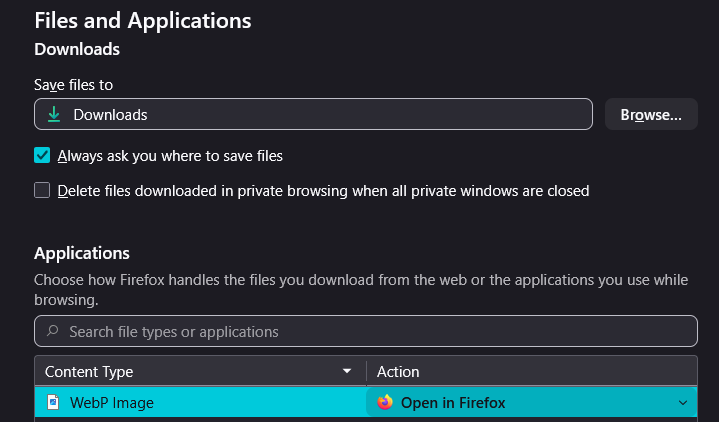
I've noticed of late that Firefox will not open .webp files in browser, instead automatically downloading without asking (I have the "Always ask you where to save files" option ticked). It then opens the photo in a new tab while leaving the now blank original image tab open with the URL from which it was downloaded. Under the applications section i have set webp images to "open in Firefox" rather than "save file" and would appreciate advice on resolving this issue.
Одабрано решење
Their server is misconfigured. It doesn't know what webp is, so when requested standalone, it ships it as an unknown type, and is handled as such on the recipient side too (triggering download).
If you try to open a webp original e.g. from wikipedia: https://commons.wikimedia.org/wiki/File:Wikipedia-logo-v2-webp.webp you should get the expected results.
Сви одговори (3)


Looks like proper settings.
Which Os and Fx versions and could you please attach a .webp file so I can test it here.?
Thanks
I am on Firefox 150.0.3 and Windows 11 26200.8457. (both are the current up to date version) I was reading this short story and attempted to open both the image on the right and the simulacra profile pictures which are .webps and both resulted in the issue. https://scp-wiki.wikidot.com/scp-9698 Thank you for your prompt response!
Одабрано решење
Their server is misconfigured. It doesn't know what webp is, so when requested standalone, it ships it as an unknown type, and is handled as such on the recipient side too (triggering download).
If you try to open a webp original e.g. from wikipedia: https://commons.wikimedia.org/wiki/File:Wikipedia-logo-v2-webp.webp you should get the expected results.