


Firefox: Saved credentials are no longer suggested

Hello Firefox helpers!
I save my login details for various websites in Firefox version 144.0.2. Normally, I navigate to the login area of a website, and Firefox suggests the right username and password, and I just have to select the correct username.
For the past few days, I have had to enter my username and password manually to log in. The functionality for saving usernames and passwords is no longer working correctly.
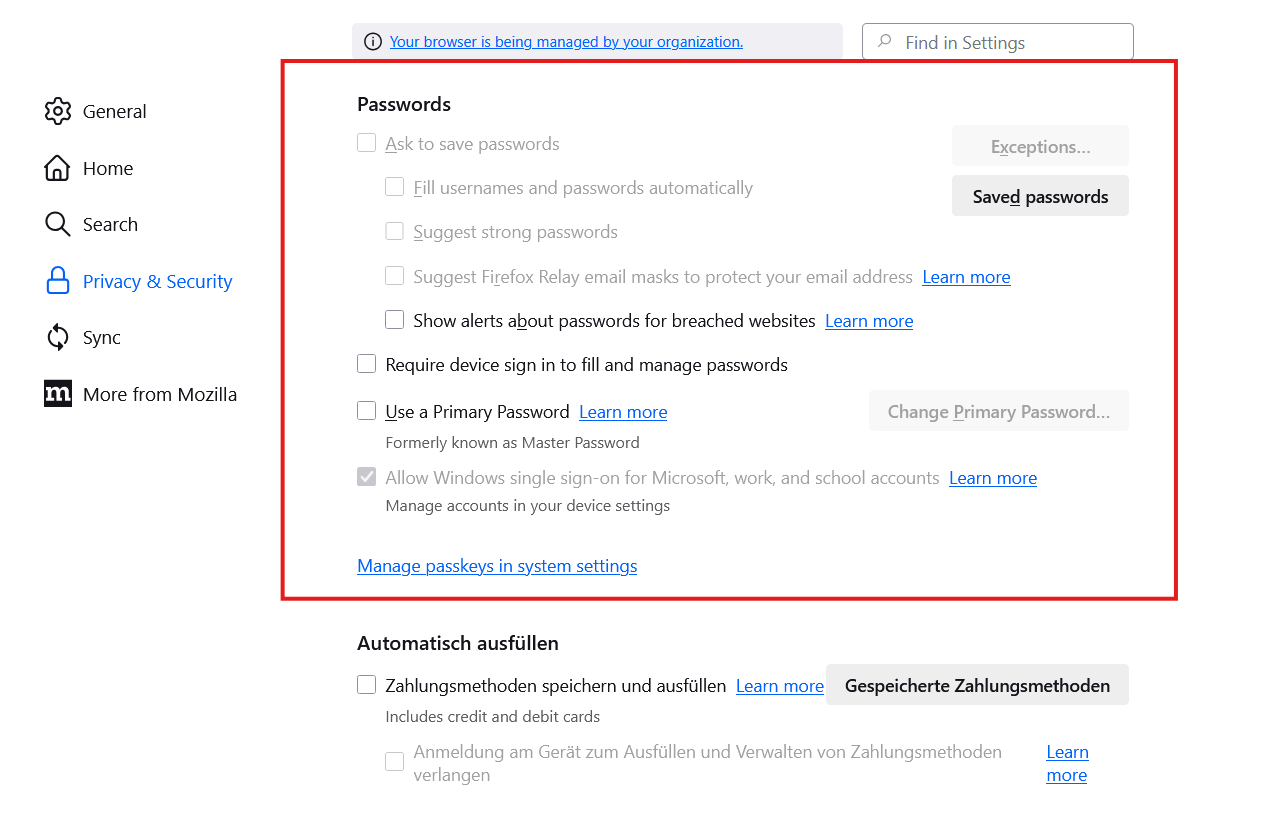
In the settings dialogue some check boxes are greyed out. See attached screenshot.
What is wrong with my firefox?
Best regards Günter
Сви одговори (1)

Did you notice in your screenshot that your browser is being managed. What OS? What security software are you running? If windows, it looks like whatever security software you're running is the cause of those items being grayed out. https://winaero.com/remove-your-browser-is-being-managed-by-your-organization-from-firefox/
Измењено од стране jonzn4SUSE