


Windows 10 reached EOS (end of support) on October 14, 2025. If you are on Windows 10, see this article.

Претражи подршку

Избегните преваре подршке. Никада од вас нећемо тражити да зовете или шаљете поруке на број или да делите личне податке. Пријавите сумњиве радње преко „Пријавите злоупотребу” опције.

Сазнај више

Setup new email account

  • 2 одговорa
  • 1 има овај проблем
  • 169 прегледа
  • Последњи одговор послао Steven

I setup and new email account for my website on NO-IP. I have two other accounts that were setup on earlier versions of Thunderbird that allowed manual configurations.

I started to add the account but got some warnings and quit. So I started over and now this latest update never gets to the manual update options. I get to the page, shown in the attached file, which never does anything. I can only press the Esc key and exit.

So I manually added the outgoing server, thinking that might work, but it did not. Any ideas how I can get the new email address working?
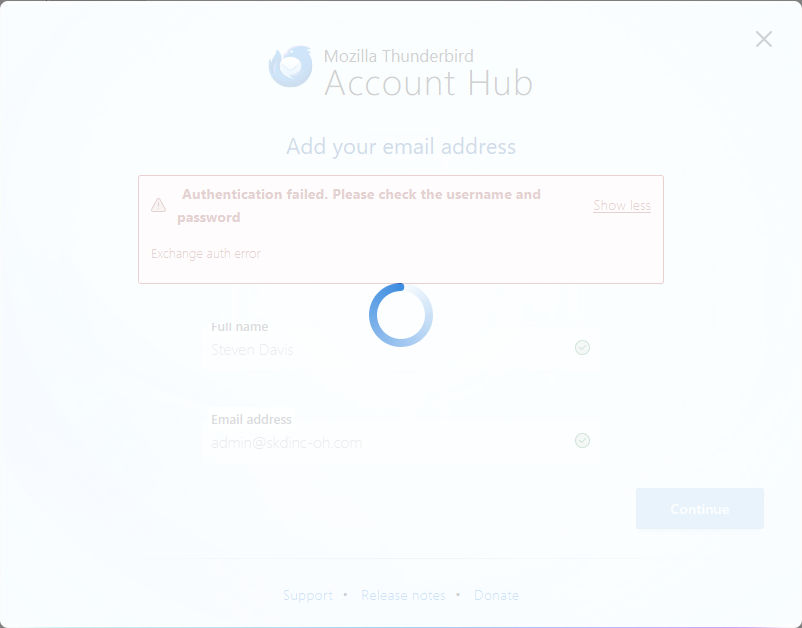
I setup and new email account for my website on NO-IP. I have two other accounts that were setup on earlier versions of Thunderbird that allowed manual configurations. I started to add the account but got some warnings and quit. So I started over and now this latest update never gets to the manual update options. I get to the page, shown in the attached file, which never does anything. I can only press the Esc key and exit. So I manually added the outgoing server, thinking that might work, but it did not. Any ideas how I can get the new email address working?
Приложени снимци екрана

Изабрано решење

Disable account hub in Settings/General, add the account from ⇶ - New Account - Email.

Прочитајте овај одговор са објашњењем 👍 0

Сви одговори (2)

Одабрано решење

Disable account hub in Settings/General, add the account from ⇶ - New Account - Email.

Thank you!! Problem solved.