


Empty Trash Confirmation

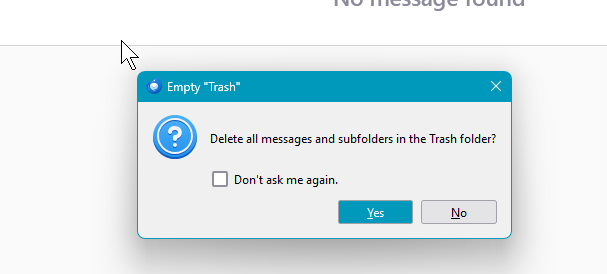
I have several email accounts linked in Thunderbird. All, but one (Gmail), displays a confirmation screen when I attempt to empty the trash folder. How do I turn on the Empty Trash Confirmation for Gmail?
Note: When the Empty Trash Confirmation is displayed there is a checkbox to "Don't Ask Me Again". I may have accidentally clicked this dialog box for my Gmail Trash Folder but I can't find how to bring back the Confirmation.
Thank you for your help!!
Изабрано решење
The preference mailnews.emptyTrash.dontAskAgain applies to all Trash folders. Settings/General, Config. editor to toggle it to false (default) if you checked the box.
Прочитајте овај одговор са објашњењем 👍 2Сви одговори (2)
Одабрано решење
The preference mailnews.emptyTrash.dontAskAgain applies to all Trash folders. Settings/General, Config. editor to toggle it to false (default) if you checked the box.
Thank you very very much for your reply - it worked perfectly!!