


Email Deletion

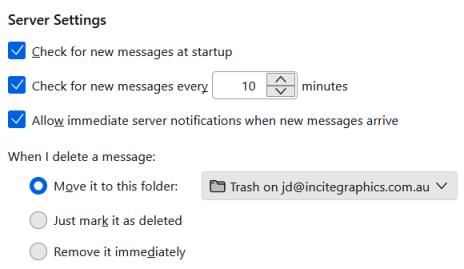
From my inbox I normally highlight any emails I want to send to trash and press the DEL key. This morning when I tried to move these across I got a message advising that if I continue it would remove all files from my trash folder. My server settings are move them to nominated folder - see attached. How can I delete from the inbox and transfer to the trash?
The second problem I encounter is whenever I attempt to log into my Thunderbird account I am directed to go through the "Create an account" process as if I don't have an existing account???
Сви одговори (2)

This morning when I tried to move these across I got a message advising that if I continue it would remove all files from my trash folder.
You may have accidentally marked messages already in Trash and pressed Del.
Одабрано решење
Thank you for your response Christ1. But no I was not in the delete trash. I tried to resolve the problem several times over the last couple of days but this morning I have been able to delete from my inbox as expected. Why, don't know. Cannot explain this situation but it appears OK now.
Cheers.