


HOW CAN I HAVE MY ADDON INCO IN MY TOOLBAR ???????

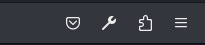
Used to be very practical with add-ons in the toolbar (cf 1st screen), but with the update they are not here anymore (cf 2nd screen). I don't want to click on the extension button for those addons I'm always using, I want to revert to having the buttons in my toolbar !!!!!!!!
PLEASE DO NOT COMMENT TO GO TO CUSTOMIZE TOOLBAR WITHOUT TESTING IT YOUSELF AND INCLUDING A SCREENSHOT !! This does not work, there are no buttons to drag and drop for the addons.
Used to be very practical with add-ons in the toolbar (cf 1st screen), but with the update they are not here anymore (cf 2nd screen).
I don't want to click on the extension button for those addons I'm always using, I want to revert to having the buttons in my toolbar !!!!!!!!
PLEASE DO NOT COMMENT TO GO TO CUSTOMIZE TOOLBAR WITHOUT TESTING IT YOUSELF AND INCLUDING A SCREENSHOT !! This does not work, there are no buttons to drag and drop for the addons.


Сви одговори (1)
- Click the Extensions button
- Click the Cogwheel icon on the right side of the specified extension
- There should be "Pin to Toolbar" option. Just click it.