


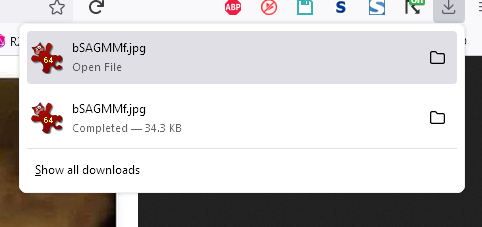
The download progress window opens every single time I download a file. How do I stop this?

Every single time I download a file, the download progress window opens itself. This is really distracting and annoying. It just started this afternoon. Closing and reopening Firefox does not fix the problem.
Изабрано решење
Hi, there is a hidden setting for whether the panel opens:
(1) In a new tab, type or paste about:config in the address bar and press Enter/Return. Click the button accepting the risk.
More info on about:config: Configuration Editor for Firefox. The moderators would like us to remind you that changes made through this back door aren't fully supported and aren't guaranteed to continue working in the future.
(2) In the search box in the page, type or paste browser.download.alwaysOpenPanel and pause while the list is filtered
(3) Double-click the preference to switch the value from true to false
Прочитајте овај одговор са објашњењем 👍 1Сви одговори (2)
Одабрано решење
Hi, there is a hidden setting for whether the panel opens:
(1) In a new tab, type or paste about:config in the address bar and press Enter/Return. Click the button accepting the risk.
More info on about:config: Configuration Editor for Firefox. The moderators would like us to remind you that changes made through this back door aren't fully supported and aren't guaranteed to continue working in the future.
(2) In the search box in the page, type or paste browser.download.alwaysOpenPanel and pause while the list is filtered
(3) Double-click the preference to switch the value from true to false
jscher2000 said
Hi, there is a hidden setting for whether the panel opens:
Excellent!! That solves it!