


Reminder to empty trash

How do I stop reminders to empty trash?
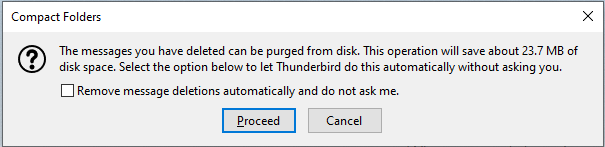
Periodically, I get a message asking me if I want the trash folder emptied (purged). I do not need these annoying reminders. How do I stop them?
Изабрано решење
@zeamays: Can you make a screenshot of what settings you have for disk/disc space and add it here? If you have TB v78 then on options / general / scroll down to disk space If you have TB v68 then on options / advanced -> network and disk space / same area "disc space"
Or, you can set directly a big value (5000 MB - which is about 5GB) and it should not ask till that value is reached... :)
Прочитајте овај одговор са објашњењем 👍 1Сви одговори (6)

Hello there Zeamays we have read your message. We try to help you.
What kind of computer do you have?
Do you have an option for the recycle bin in the settings?
Have you installed addons or extensions for these?
check it out.
I have looked at the popup I will continue searching Thunderbird for you. Thank you for your message.
greetings Firefox Volunteer.
Hello there Zeamays.
So after checking this will this continue?
[] remove message deletions automaticly and dont ask me ..
Greetings
Firefox Volunteer.

Одабрано решење
@zeamays: Can you make a screenshot of what settings you have for disk/disc space and add it here? If you have TB v78 then on options / general / scroll down to disk space If you have TB v68 then on options / advanced -> network and disk space / same area "disc space"
Or, you can set directly a big value (5000 MB - which is about 5GB) and it should not ask till that value is reached... :)
Измењено од стране svlad2009
Please see attached image.
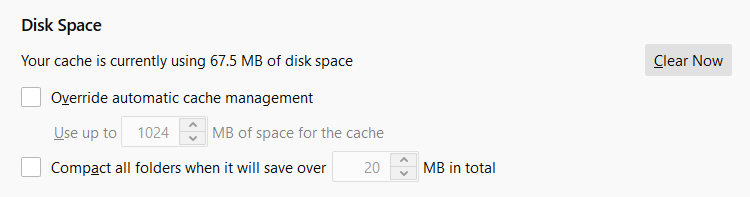
OK, activate compact folder automatically - set value 5000 and you should be fine for couple of years... :)
Hi, I have missed to mention you that the "purge" text is a replacement of the old text "compact". So if you have compacted in the past your mails then you should still do it - but now it's telling you "purge"... If "compact folders" doesn't mean anything to you then you can ignore this post :)