

Windows 10 reached EOS (end of support) on October 14, 2025. If you are on Windows 10, see this article.

Претражи подршку

Избегните преваре подршке. Никада од вас нећемо тражити да зовете или шаљете поруке на број или да делите личне податке. Пријавите сумњиве радње преко „Пријавите злоупотребу” опције.

Сазнај више
Solved Архивирано

Save passwort but never ask for update?

Elenktik

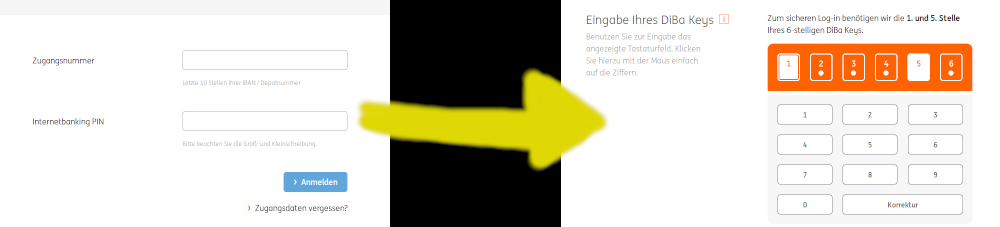
When I login at my online bank account, I am always asked for two passwords (see image), where the second password just consists of 2 numbers.

Every time I can use the autosaved password for the first form. After submitting the second form Firefox asks me always if I want to update the autosaved password for the first form. I always have to press "no" and when I hit accidentally "yes" I have to reenter my password in the first form.

The second form has always two random digits, so I don't wont to save this data anyway. I just don't wont to get asked anymore if I want to update my password.

Can I save a password for a website but never get asked again to update it?
When I login at my online bank account, I am always asked for two passwords (see image), where the second password just consists of 2 numbers. Every time I can use the autosaved password for the first form. After submitting the second form Firefox asks me always if I want to update the autosaved password for the first form. I always have to press "no" and when I hit accidentally "yes" I have to reenter my password in the first form. The second form has always two random digits, so I don't wont to save this data anyway. I just don't wont to get asked anymore if I want to update my password. Can I save a password for a website but never get asked again to update it?
Приложени снимци екрана

Сви одговори (2)

Одабрано решење

You have to choose Never save password for this domain. After that, first form should be autofilled with an old pass, but the question shouldn't show up anymore.

Holy Cow it works

Измењено од стране Elenktik