


i want to use add on, but i dont know its name, i have picture of it. can u help me?

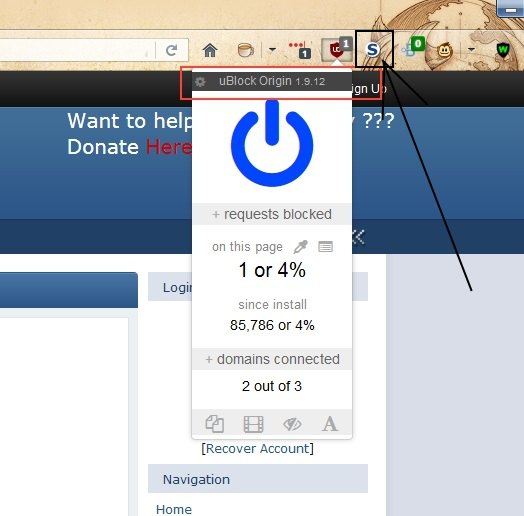
this is some pop up block add on, i dont know how to find it. on this picture, its on the right side of ublock origin, and it has blue letter S on it. I marked it
Сви одговори (6)
When you look closely, you'll see that it does mention the add-on's name : it's uBlock Origin ......
https://addons.mozilla.org/en-US/firefox/addon/ublock-origin/
Seperate issue :
Your system details show that you need to update your Adobe Flash Player - you're running an old version, which can cause problems. Would you please uninstall your current version and install the latest version, which is 30.0.0.134
Uninstaller : https://helpx.adobe.com/flash-player/kb/uninstall-flash-player-windows.html
https://get.adobe.com/flashplayer/
Note : some 'extras' may be offered in the download.
Одабрано решење
The toolbar button with the blue S is NoScript.
the-edmeister said
The toolbar button with the blue S is NoScript. https://addons.mozilla.org/en-US/firefox/addon/noscript/
Good for you to notice that !
McCoy Tnx for Flash advice.
the-edmeister tnx for toolbar
And I just noticed that you did mention uBlock Origin - I'm going to find me a rock to hide under ......