


Specific site search does not work in Android
From Chrome browser, or from Google.com I can search a specific site by prefacing the search with: site:(site-name) (search-words). For example: site:jw.org paradise will produce search results for "paradise" only from the jw.org site. However, in Firefox for Android, even when Google is the default search engine, this does not work. I either have to switch to the Chrome app or in Firefox navigate to Google.com. Is this a bug?
Изабрано решење
That's odd. Maybe Firefox thinks site: is a protocol (like http: or custom ones)? Unfortunately, in order to submit that query in Firefox, you have to change your habit and either:
(A) put your search term(s) first and your site: term after that, or (B) tap an apostrophe before site so Firefox realizes it can't be a valid URL
Прочитајте овај одговор са објашњењем 👍 1Сви одговори (5)
Одабрано решење
That's odd. Maybe Firefox thinks site: is a protocol (like http: or custom ones)? Unfortunately, in order to submit that query in Firefox, you have to change your habit and either:
(A) put your search term(s) first and your site: term after that, or (B) tap an apostrophe before site so Firefox realizes it can't be a valid URL
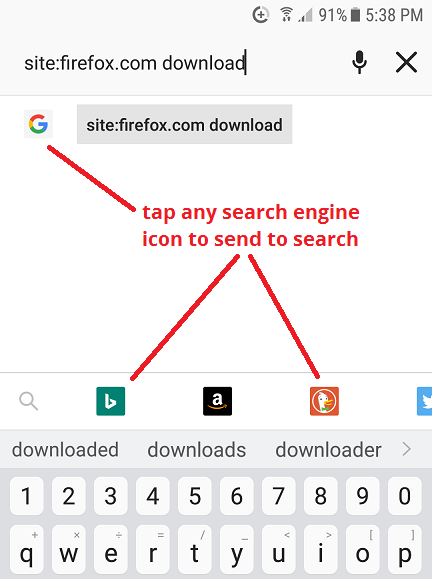
Actually, no, the best workaround is:
After typing your query, instead of tapping the Go button or Enter on the keyboard, tap the "G" or query text shown on the suggestion panel below the address bar. This guarantees a search rather than Firefox possibly analyzing the address bar contents as a URL.
Edit: Added a screenshot
Измењено од стране jscher2000 - Support Volunteer
I like jscher2000 option (A). It's simple, no extra keystrokes, and best of all, it works! Thanks!
Yes. Your second idea works just as well
I submitted a bug report. Maybe it will get fixed someday. https://bugzilla.mozilla.org/show_bug.cgi?id=1456008