

Ова тема је архивирана.
Питајте друго питање ако вам је потребна помоћ.

Архивирано
have a green screen on my desk top

when I open a video I only get a green screen . I can hear the video playing
when I open a video I only get a green screen . I can hear the video playing
Сви одговори (2)
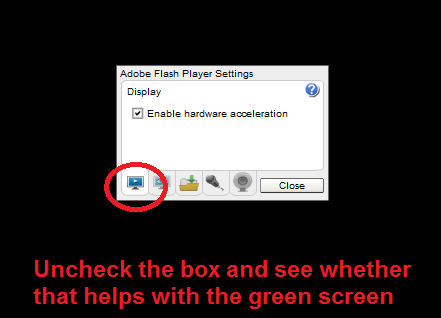
Historically, this has indicated a problem between the Flash plugin and your graphics card driver software. The workaround is to right-click the Flash media and click Settings, then uncheck the box for using Hardware Acceleration and click the Close button. (Example screen shot attached.) You might need to reload the page after that.
The System Details List shows that you have multiple Flash plugins.
- Shockwave Flash 11.3 r300
- Shockwave Flash 21.0 r0
You can find the installation path of all plugins on the about:plugins page.
You can check the Flash player installation folder for multiple Flash player plugins and remove older version(s) of the plugin (NPSWF32) and possibly (re)install the latest Flash player.
- (32 bit Windows) C:\Windows\System32\Macromed\Flash\
- (64 bit Windows) C:\Windows\SysWOW64\Macromed\Flash\