Windows 10 reached EOS (end of support) on October 14, 2025. If you are on Windows 10, see this article.

Претражи подршку

Избегните преваре подршке. Никада од вас нећемо тражити да зовете или шаљете поруке на број или да делите личне податке. Пријавите сумњиве радње преко „Пријавите злоупотребу” опције.

Сазнај више
Архивирано

storage/permanent/chrome/idb/ strange files

philipp одговорено
user1071620

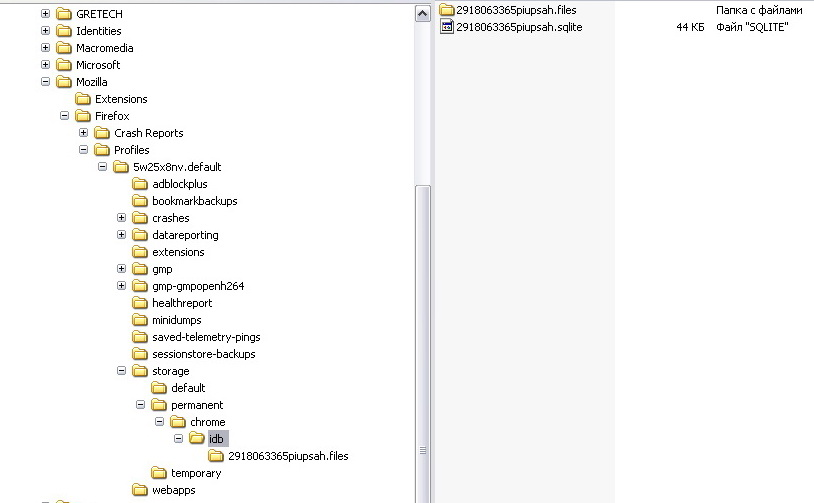
Hello, recently I found these files: C:\Documents and Settings\[name]\Application Data\Mozilla/Firefox/[number].default/storage/permanent/chrome C:\Documents and Settings\[name]\Application Data\Mozilla/Firefox/[number].default/storage/permanent/chrome/.metadata C:\Documents and Settings\[name]\Application Data\Mozilla/Firefox/[number].default/storage/permanent/chrome/idb C:\Documents and Settings\[name]\Application Data\Mozilla/Firefox/[number].default/storage/permanent/chrome/idb/2918063365piupsah.files C:\Documents and Settings\[name]\Application Data\Mozilla/Firefox/[number].default/storage/permanent/chrome/idb/2918063365piupsah.sqlite I can delete them, but they reappear with every Mozilla restart. also, in the folder ...\storage\permanent\chrome\idb temporarily appearing (for couple of seconds) two files - 2918063365piupsah.sqlite-shm (32 kb) and 2918063365piupsah.sqlite-wal (0 kb)

Are those files (2918063365piupsah.sqlite / 2918063365piupsah.sqlite-shm / 2918063365piupsah.sqlite-wal) SAFE (that's the most important question)? Really weird names and location. And what are those? What makes them appear?

[Firefox 44.0.2. Windows XP. Three antiviruses didn't show anything suspicious]

Hello, recently I found these files: C:\Documents and Settings\[name]\Application Data\Mozilla/Firefox/[number].default/storage/permanent/chrome C:\Documents and Settings\[name]\Application Data\Mozilla/Firefox/[number].default/storage/permanent/chrome/.metadata C:\Documents and Settings\[name]\Application Data\Mozilla/Firefox/[number].default/storage/permanent/chrome/idb C:\Documents and Settings\[name]\Application Data\Mozilla/Firefox/[number].default/storage/permanent/chrome/idb/2918063365piupsah.files C:\Documents and Settings\[name]\Application Data\Mozilla/Firefox/[number].default/storage/permanent/chrome/idb/2918063365piupsah.sqlite I can delete them, but they reappear with every Mozilla restart. also, in the folder ...\storage\permanent\chrome\idb temporarily appearing (for couple of seconds) two files - 2918063365piupsah.sqlite-shm (32 kb) and 2918063365piupsah.sqlite-wal (0 kb) Are those files (2918063365piupsah.sqlite / 2918063365piupsah.sqlite-shm / 2918063365piupsah.sqlite-wal) SAFE (that's the most important question)? Really weird names and location. And what are those? What makes them appear? [Firefox 44.0.2. Windows XP. Three antiviruses didn't show anything suspicious]

Сви одговори (2)

sorry, text messed up for some reason here two pics to clarify this

hi, these folder structures are created when websites make use of the storage web apis like indexeddb: https://developer.mozilla.org/en-US/docs/Web/API/IndexedDB_API