


Bookmarks toolbar appearance changed

I use Dark Fox theme to change my FF appearance to have the whole bookmarks toolbar-tabs-navigation area black, or at least as dark as I can get it.
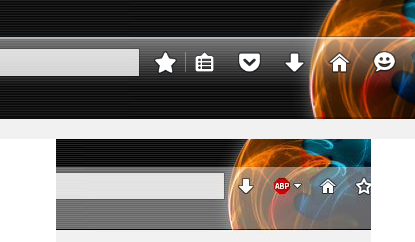
Yesterday night, the whole area changed to have a gray lines overlay on top of the black theme and became an eyesore. I'm not sure what changed as I didn't touch any settings. Any ideas on how to change it back?
Attached image shows the comparison of what I am talking about.
Изабрано решење
Try the CTR extension and look at the setting(s) in the CTR Options/Preferences here:
- CTR Options > Toolbars (3)
See also:
- /questions/1106779 Is there a way to get rid of the white/highlighted look of the bookmarks toolbar?
Сви одговори (5)
Here is the image.
Одабрано решење
Try the CTR extension and look at the setting(s) in the CTR Options/Preferences here:
- CTR Options > Toolbars (3)
See also:
- /questions/1106779 Is there a way to get rid of the white/highlighted look of the bookmarks toolbar?
Измењено од стране cor-el
Cor-el, my issue is same as the one you have linked.
I see jscher2000 say "Based on a couple other threads, there is a reduced transparency of the toolbars in Firefox 44 (semi-opaque or translucent appearance", is there a way to manually edit the transparency instead of completely turning it off?
akihikosama said
is there a way to manually edit the transparency instead of completely turning it off?
This is from the Windows 7 theme The first rule creates a gradient background on the main toolbar that starts off 40% opaque white and fades to transparent (top to bottom). The second rules removes the background on the other bars (not counting the active tab itself).
#nav-bar {
  background-image: linear-gradient(rgba(255,255,255,.4), transparent) !important;
}
#navigator-toolbox > toolbar:not(#toolbar-menubar):not(#TabsToolbar):not(#nav-bar) {
  background-image: none;
}
Is that along the lines of what you're looking for??
jscher2000 said
Is that along the lines of what you're looking for??
Its close. The gradient portion is good, but the Bookmarks bar went back to gray. I have used the completely off transparency for a few hours and am more satisfied with it than the original gradient. :)