


how do I make sure Safe Search from Virgin Media is turned on in Firefox's settings

My broadband supplier in Virgin Media. They have Safe Search which blocks all Pornography, Hate, Crime, Violence and Self-harm and suicide websites but it doesn't work when searching in Google. They say I should make sure "Safe Search is turned on in your browser's search engine's settings" I cannot find how to to do that.
Many thanks
Barry Hughes
Изабрано решење
IMO, if that is a feature offered by your ISP - Virgin Media - I would think the controls for that would be available on a Virgin Media website page. Or it would need some type of addon.
Is this what you are talking about? Web Safe http://my.virginmedia.com/my-apps/websafe.html
Прочитајте овај одговор са објашњењем 👍 0Сви одговори (2)
This is a Google specific issue.
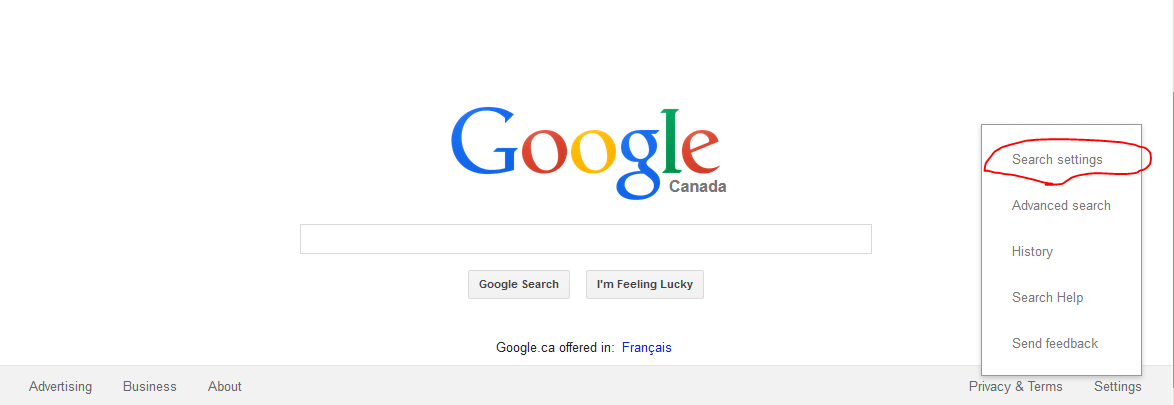
On the Google homepage click Settings > Search settings. On the page that comes up, check the "Filter explicit results." box to enable SafeSearch. See attached screenshot.
Измењено од стране CoryMH
Одабрано решење
IMO, if that is a feature offered by your ISP - Virgin Media - I would think the controls for that would be available on a Virgin Media website page. Or it would need some type of addon.
Is this what you are talking about? Web Safe http://my.virginmedia.com/my-apps/websafe.html