

Windows 10 reached EOS (end of support) on October 14, 2025. If you are on Windows 10, see this article.

Iskanje po podpori

Izogibajte se prevarantski tehnični podpori. Nikoli vam ne bomo naročili, da pokličete telefonsko številko ali nam pošljete osebne podatke. Sumljivo dejavnost prijavite z gumbom »Prijavi zlorabo«.

Več o tem
Rešeno

Firefox Printing Issue – Landscape Labels Printing in Portrait Orientation

Jegatheesh M

Dear Firefox Team, We are facing a printing issue with the latest version of Mozilla Firefox and would appreciate your help in resolving it. Our web-based healthcare application generates patient labels containing barcodes and patient information. These labels are designed to print in landscape orientation, and the Firefox print preview displays them correctly. However, when printing directly from Firefox, the labels are printed in portrait orientation, causing alignment and formatting issues. This issue was not present in an earlier version of Firefox, and printing was working correctly before. Unfortunately, we do not remember which Firefox version we were using at that time. We have observed the following: The print preview displays the label correctly in landscape orientation. Direct printing from Firefox prints the label in portrait orientation. Manually selecting Landscape in the Firefox print settings resolves the issue. The same application prints correctly in Microsoft Edge and Google Chrome without any manual changes. Saving the output as a PDF from Firefox preserves the correct landscape orientation. Since the issue appears to have started after a Firefox update and occurs only when printing directly, could you please investigate whether this is related to a change in Firefox's print handling or its interaction with printer settings? We would appreciate any recommended configuration or fix that would allow Firefox to retain the landscape orientation when printing directly. Thank you for your support. We look forward to your guidance.
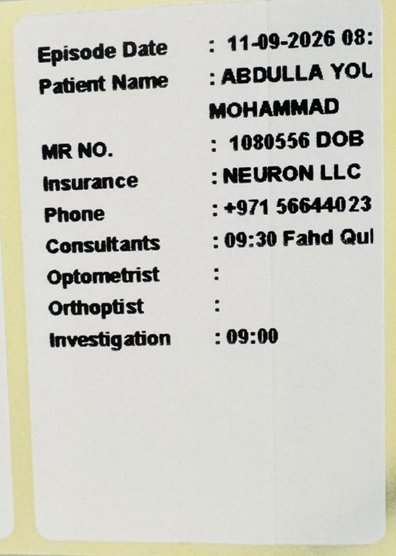
Dear Firefox Team, We are facing a printing issue with the latest version of Mozilla Firefox and would appreciate your help in resolving it. Our web-based healthcare application generates patient labels containing barcodes and patient information. These labels are designed to print in landscape orientation, and the Firefox print preview displays them correctly. However, when printing directly from Firefox, the labels are printed in portrait orientation, causing alignment and formatting issues. This issue was not present in an earlier version of Firefox, and printing was working correctly before. Unfortunately, we do not remember which Firefox version we were using at that time. We have observed the following: The print preview displays the label correctly in landscape orientation. Direct printing from Firefox prints the label in portrait orientation. Manually selecting Landscape in the Firefox print settings resolves the issue. The same application prints correctly in Microsoft Edge and Google Chrome without any manual changes. Saving the output as a PDF from Firefox preserves the correct landscape orientation. Since the issue appears to have started after a Firefox update and occurs only when printing directly, could you please investigate whether this is related to a change in Firefox's print handling or its interaction with printer settings? We would appreciate any recommended configuration or fix that would allow Firefox to retain the landscape orientation when printing directly. Thank you for your support. We look forward to your guidance.
Priloženi posnetki zaslona

Vsi odgovori (1)

Izbrana rešitev

Created another question. Please remove this question. Thanks.

Vprašajte

Če želite objaviti odgovor, se morate prijaviti v svoj ​​račun. Če računa še nimate, zastavite novo vprašanje.