

Ta tema je arhivirana.
Postavite prosim novo vprašanje, če potrebujete pomoč.

Rešeno
Arhivirano
Thunderbird 91 - how to edit a calendar event with a double click?

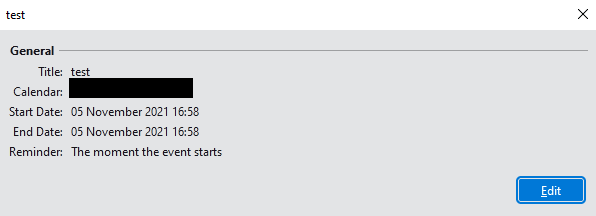
In Thunderbird 91.3.0, double clicking on an event in the calendar pops up a small window with summary details of the event. You then have to click a separate "Edit" button to edit the event.
In previous versions, double clicking took you straight to the edit window. That's a more efficient workflow and I'd like to stick with it. How can I configure this in 91?
In Thunderbird 91.3.0, double clicking on an event in the calendar pops up a small window with summary details of the event. You then have to click a separate "Edit" button to edit the event.
In previous versions, double clicking took you straight to the edit window. That's a more efficient workflow and I'd like to stick with it. How can I configure this in 91?
Vsi odgovori (2)
Izbrana rešitev
Thanks for the link - will continue on that thread.