


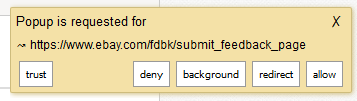
The "popup is requested for" box comes up after updating to 68.0.2, how to remove it?

This popup box keeps popping up that says to allow. How do I remove it or I'm putting in older version 68.0.1 Please give me the official site download link for the version 68.0.1 before update if your instructions do not work.
Vsi odgovori (3)
That popup is not from Firefox. It looks to be from an add-on, or perhaps an antivirus. What anti-virus do you use, and have you tried disabling any suspicious add-ons?
I ran MS security essentials and it came back empty. Could winPcap 4.1.2 (cace tech) in my control panel be doing this. I have windows 7 pro 64 bit. Can I uninstall this or will there be a problem if I do? I've checked startup thru msconfig, didn't see anything out of norm.
Please run a Malwarebytes scan as well.
I would suggest trying to remove winPcap as well.