


Too much RAM is used. Settings not saved!

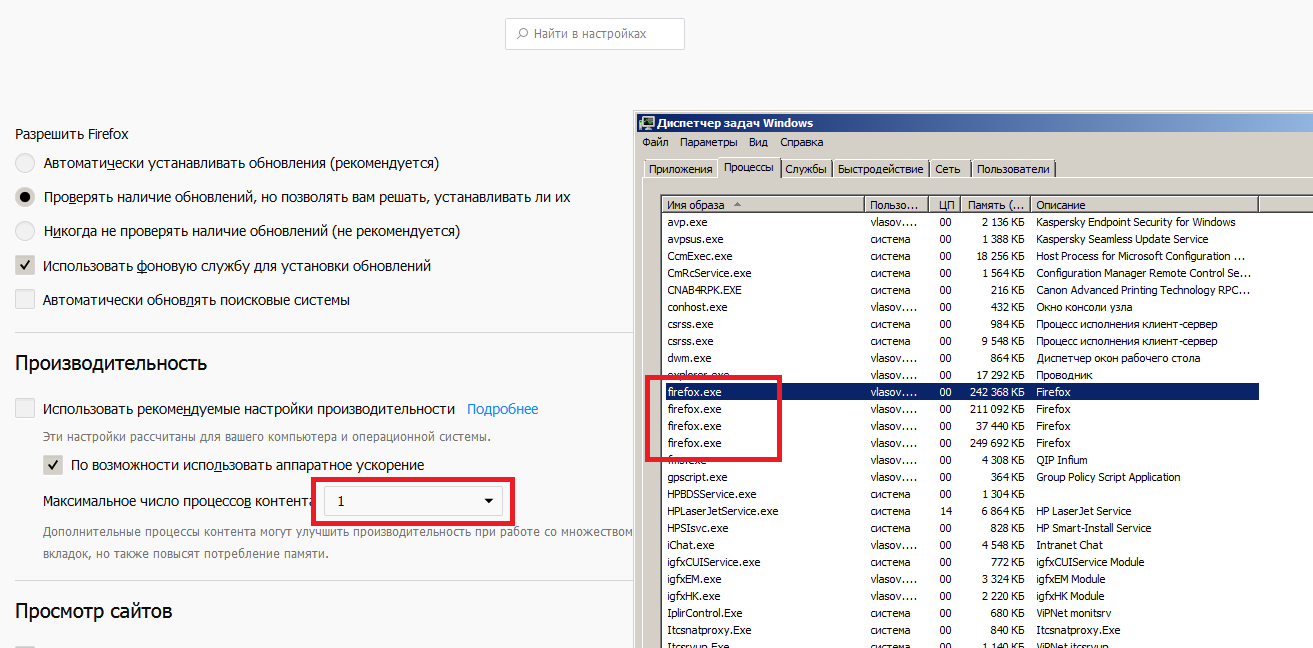
Installed in the settings using 1 process, but the browser creates them as before four. A very large amount of memory is used, more than 700MB. In system requirements, you have at least 512 MB of RAM ( https://www.mozilla.org/en-US/firefox/61.0.2/system-requirements/ ). More than 700MB RAM the browser uses when opening only one tab!!!! Windows 6.1 32bit Firefox 61.0.2 (32bit)
Izbrana rešitev
700MB of RAM really isn't all that much, especially when there are 4 processes running. How much RAM do you have overall?
Preberite ta odgovor v kontekstu 👍 0Vsi odgovori (3)
Izbrana rešitev
700MB of RAM really isn't all that much, especially when there are 4 processes running. How much RAM do you have overall?
Hmm.. I have 4GB of RAM. 700Mb is one tab. If I open 5 or more tabs, then after 4 hours of surfing on the Internet my Mozilla crashes. Do you have 512MB RAM in system requirements, how can FF work with such RAM at all?
Why does Mozilla create 4 processes, if I set only one in the settings?