


A file labelled "G Mail" has appeared, why?
A file labelled "Gmail" has appeared on my Thunderbird, Why & how do I get rid? I am getting more spam & junk mail since it appeared! John
Izbrana rešitev
OK, I can read that. ;-)
This looks like a regular gmail (Googlemail) account; in Thunderbird, at least, they come with a bundle of standard "system folders" gathered under the "gmail" heading. These are present due to the particular way that gmail supports IMAP, which is the email protocol your Thunderbird is using to talk to the mail provider.
ntlworld sounds like an old cable company in Britain that I though had been bought up and merged into something else, such as virgin. It would appear that whoever is running ntlworld accounts these days has subcontracted the email service out to gmail. This is quite common; between them, yahoo, outlook.com and gmail account for a large proportion of the bundled email services supplied by ISPs, particularly in the USA, but also here to a lesser extent in the UK. bt.com, for instance, up to recently used yahoo for its email.
By and large, I leave the gmail folder collapsed, so I don't have to see its contents. Just click the little arrow next to "gmail" and that folder tree should close and collapse into one line.
Occasionally I do need to see what's in Bin (aka Trash) or Sent. One folder which I consider to be unhelpful is All Mail, which represents the all-in-one-heap storage model that gmail uses. Google are good at searching (ha ha) and so their approach to managing email is to put it all in one place and use tags or labels to sort it, rather than moving messages into folders, which is a more traditional system. So all your other folders are populated with connections to the actual messages in All Mail and so you don't (usually) need to see this All Mail folder. I'd right-click it, select Subscribe and unsubscribe from it.
There's no obvious reason why gmail should have suddenly appeared by itself in your Thunderbird, unless ntlworld have recently switched you over to gmail, perhaps without warning you. If so, it may be slow for the time being if it is feverishly trying to update Thunderbird with lots of old stored messages, and your use of folders suggests to me that you do store mails. (People who don't store mails tend to have emptier Inboxes and fewer sub-folders!)
Bottom line:
- your email provider (ntlworld) uses gmail to provide your email service
- this is how gmail accounts appear in Thunderbird
- there's little you can do about how it looks. :-(
Vsi odgovori (6)
Hello,
In order to better assist you with your issue please provide us with a screenshot. If you need help to create a screenshot, please see How do I create a screenshot of my problem?
Once you've done this, attach the saved screenshot file to your forum post by clicking the Browse... button below the Post your reply box. This will help us to visualize the problem.
Thank you!
A screen shot as requested. You can see the 'gmail' folder under Bookmarks which were not seen before the latest update

Your screenshot has been reduced in size and is unreadable. So we are no closer to understanding your interesting choice of words such as "file" and "bookmarks", neither of which make sense in the context of an email client.
Another attempt, (please be patient withthis silver surfer), I am confusing Firebird with firefox. the 'files' are in the inbox of the two email addresses I use. The 'G Mail' file appeared after the last update of TB. I don't need it nor use it and it seems to clog up the accounts! Salut John
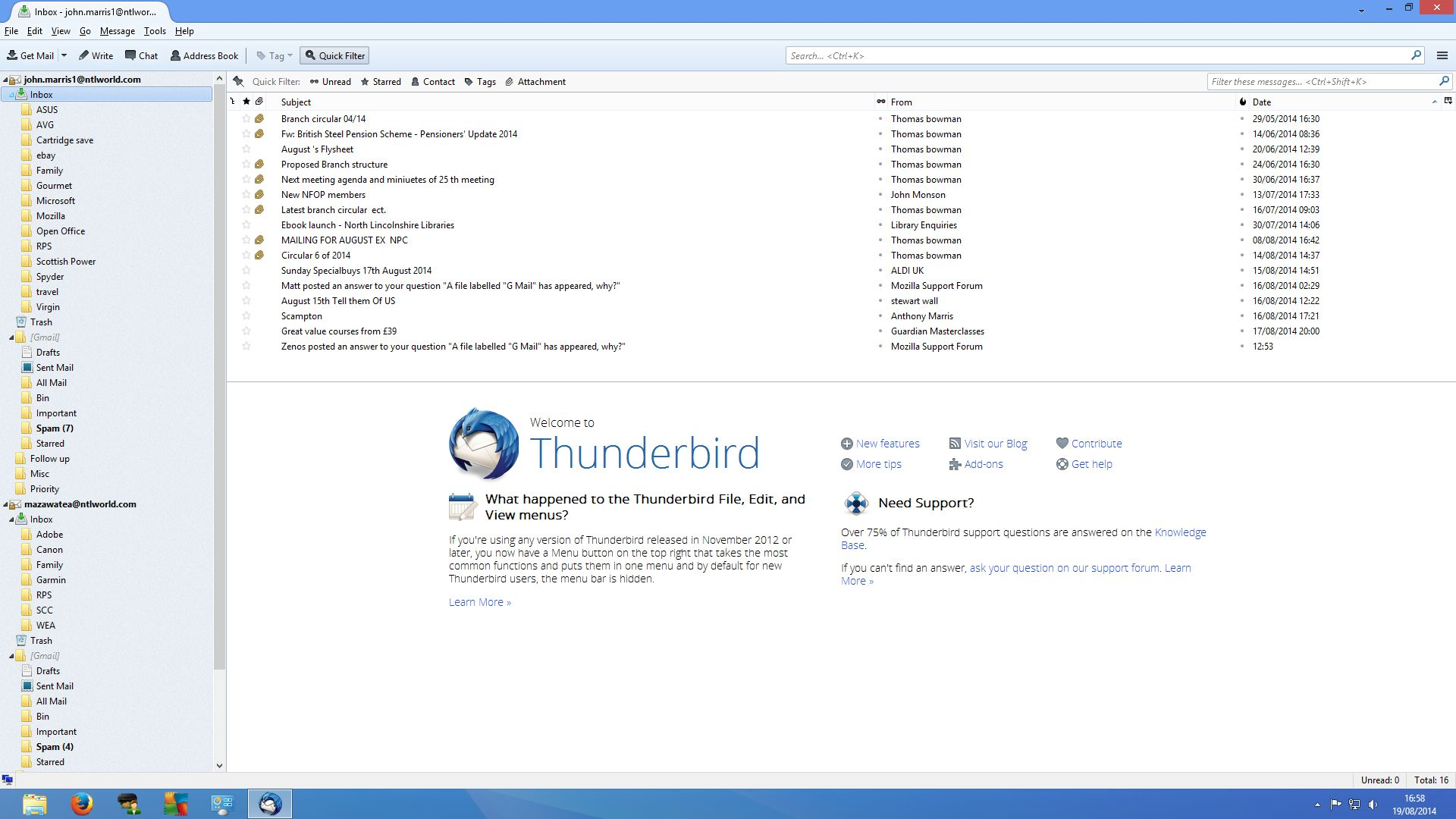
Izbrana rešitev
OK, I can read that. ;-)
This looks like a regular gmail (Googlemail) account; in Thunderbird, at least, they come with a bundle of standard "system folders" gathered under the "gmail" heading. These are present due to the particular way that gmail supports IMAP, which is the email protocol your Thunderbird is using to talk to the mail provider.
ntlworld sounds like an old cable company in Britain that I though had been bought up and merged into something else, such as virgin. It would appear that whoever is running ntlworld accounts these days has subcontracted the email service out to gmail. This is quite common; between them, yahoo, outlook.com and gmail account for a large proportion of the bundled email services supplied by ISPs, particularly in the USA, but also here to a lesser extent in the UK. bt.com, for instance, up to recently used yahoo for its email.
By and large, I leave the gmail folder collapsed, so I don't have to see its contents. Just click the little arrow next to "gmail" and that folder tree should close and collapse into one line.
Occasionally I do need to see what's in Bin (aka Trash) or Sent. One folder which I consider to be unhelpful is All Mail, which represents the all-in-one-heap storage model that gmail uses. Google are good at searching (ha ha) and so their approach to managing email is to put it all in one place and use tags or labels to sort it, rather than moving messages into folders, which is a more traditional system. So all your other folders are populated with connections to the actual messages in All Mail and so you don't (usually) need to see this All Mail folder. I'd right-click it, select Subscribe and unsubscribe from it.
There's no obvious reason why gmail should have suddenly appeared by itself in your Thunderbird, unless ntlworld have recently switched you over to gmail, perhaps without warning you. If so, it may be slow for the time being if it is feverishly trying to update Thunderbird with lots of old stored messages, and your use of folders suggests to me that you do store mails. (People who don't store mails tend to have emptier Inboxes and fewer sub-folders!)
Bottom line:
- your email provider (ntlworld) uses gmail to provide your email service
- this is how gmail accounts appear in Thunderbird
- there's little you can do about how it looks. :-(
Thanks Zenos, ntl was taken over by Virgin, and there was something recently that needed to be done if using outlook & others, but not firebird.