


Windows 10 reached EOS (end of support) on October 14, 2025. If you are on Windows 10, see this article.

Támogatás keresése

Kerülje el a támogatási csalásokat. Sosem kérjük arra, hogy hívjon fel egy telefonszámot vagy osszon meg személyes információkat. Jelentse a gyanús tevékenységeket a „Visszaélés bejelentése” lehetőséggel.

További tudnivalók

A témacsoportot lezárták és archiválták. Tegyen fel új kérdést, ha segítségre van szüksége.

Can't insert pictures into email body

  • Nincs válasz
  • 1 embernek van ilyen problémája
  • 12 megtekintés

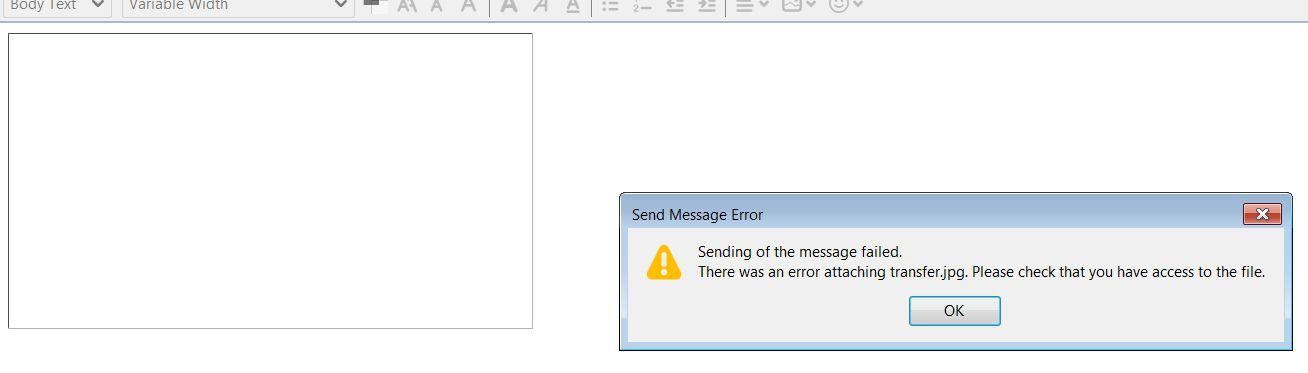
I've always been able to insert a photo into the body of my emails until several months ago.. Since then it gives a white box instead of the photo and if I try to send the email I get an error message that says, "Sending of the message failed. There was an error attaching (name of photo.jpg). Please check that you have access to the file." **I've uploaded an image here. The file is a picture I have saved on my desktop, so I certainly have access to it, and I'm not doing anything differently than I ever had before. I've been searching for months to find the answer to no avail and hoped this latest update would fix it, but it did not. I've looked through the forum and the only suggestion I've found is to download TB Portable and use that instead - but it does not have good reviews.. This USED to work and I don't understand why it doesn't anymore! PLEASE help me find the secret setting to fix this. Thank you!
I've always been able to insert a photo into the body of my emails until several months ago.. Since then it gives a white box instead of the photo and if I try to send the email I get an error message that says, "Sending of the message failed. There was an error attaching (name of photo.jpg). Please check that you have access to the file." **I've uploaded an image here. The file is a picture I have saved on my desktop, so I certainly have access to it, and I'm not doing anything differently than I ever had before. I've been searching for months to find the answer to no avail and hoped this latest update would fix it, but it did not. I've looked through the forum and the only suggestion I've found is to download TB Portable and use that instead - but it does not have good reviews.. This USED to work and I don't understand why it doesn't anymore! PLEASE help me find the secret setting to fix this. Thank you!
Csatolt képernyőmentések