


where the heck are my bookmarks

i just download firefox to my s3 and s4. on my s3, the bookmarks folder is there w all my bookmarks. but i can't get it to appear om the s4. i already tried refreshing the page.
Solución elegida
THANK YOU!!! The info in Firefox for how to set up an android to sync is useless to me. I have searched all over and finally found this answer. Tried going to the galaxy s4 settings as you suggested and THERE IT WAS under the accounts tab. I'd not had to do that with my former droid.
Firefox should really update their info on the how to sync page.
Leer esta respuesta en su contexto 👍 1Todas las respuestas (5)
hello stlev99, what have you done beforehand. have you tried to import your bookmarks form android or did you set-up firefox sync?
Hi, Philipp, I set up firefox sync as instructed by the site itself. I followed the steps on the Galaxy S4 (and S3, but s3 had no problem), then followed the steps on my laptop. But when I open the browser on the S4, and click on the bookmarks tab, it doesn't show my bookmarks folder. I tried refreshing the page, but that didn't do it either. And as I say, it worked on my S3, seemingly. Thanks for your help.
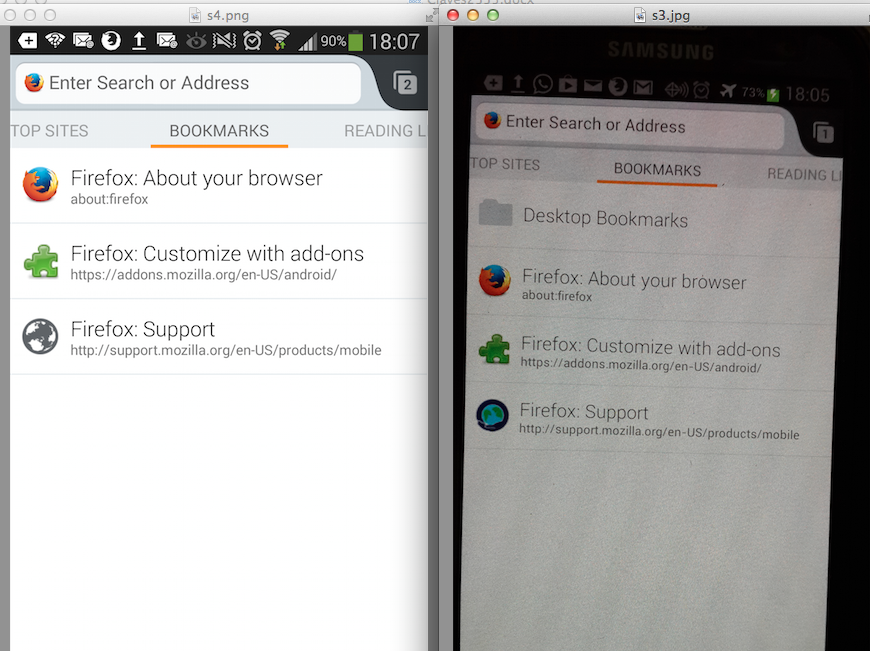
can you check on your S4 under the system's settings app > accounts if firefox sync is shown there, set up to sync bookmarks and if it shows a last successful sync time...
Solución elegida
THANK YOU!!! The info in Firefox for how to set up an android to sync is useless to me. I have searched all over and finally found this answer. Tried going to the galaxy s4 settings as you suggested and THERE IT WAS under the accounts tab. I'd not had to do that with my former droid.
Firefox should really update their info on the how to sync page.
OMG, that was soooo simple. Thanks. Case solved.