


RealPlayer Browser Record Plugin and Java Plugin 7 update 12 to 15?

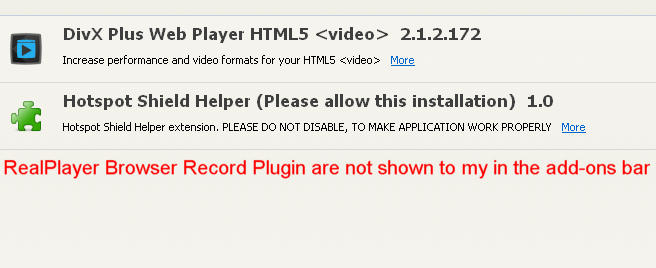
I had several problems with Firefox 19 where I've installed the Real Player, but that RealPlayer Browser Record Plugin not appear in the add-ons bar and wondering what's going on? The second problem is that there are Java blocked?
All Replies (11)

Check your plugins
I use the latest version of the Firefox browser, Java and Flash Player and Real Player, and every time I try to install Real Player timely RealPlayer Browser Record Plugin are not shown to my in the add-ons bar also have this problem https://addons.mozilla.org/en-US/firefox/blocked/p294
In order to uninstall a possibly unwanted extension, please do the following:
- From the Firefox window click the Firefox button at the top left and select Add-ons, or, if the Firefox button is not shown, click the Tools menu and click Add-ons.
- Once the Add-on Manager has opened in a new tab, click the Extensions button on the left side of the window.
- You should now see a list of your installed extensions on the right side together with buttons on the right side of each extension.
- To remove an extension from Firefox, simply click the Remove button. You should see a message that informs you about the successful removal of the add-on.
- Note that some add-ons require a Firefox restart to be removed completely. To perform a Firefox restart after the add-on removal, click the Restart now link in the message.
You can find further information about uninstalling extensions in the following articles:
Remove a toolbar that has taken over your Firefox search or home page
that’s not help
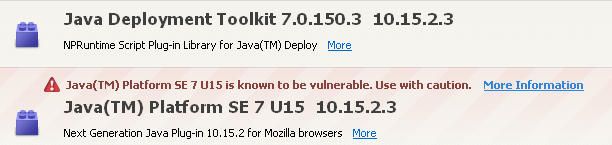
The Firefox developers have decided to block all Java versions because of ongoing security issues with Java.
If the Java plugin is enabled via the about:addons page then you can manually enable the blocked Java plugin for specific trusted websites via the red click-to-play icon on the location bar.
- bug 843373 - Please Enable CTP for all released versions of Java
(please do not comment in bug reports: https://bugzilla.mozilla.org/page.cgi?id=etiquette.html)
See also:
Java is enabled but still this warning appears?And what about a problem where I installed the Real Player over and over again to enable RealPlayer Browser Record Plugin but it seems that there is a problem with the Firefox browser and won't to install RealPlayer Browser Record Plugin ?
See Download Videos with RealDownloader: http://www.real.com/realdownloader
is this free? lol
Even this did not help to fix the RealPlayer Browser Record Plugin problem?
The RealDownloader should replace the RealPlayer Browser Record Plugin extension for Firefox and you can use this instead. I'm on Linux, so I don't know how this program works with Firefox.
Did you try the steps as listed on that page?
Get Started - How to download Web videos
- Install RealDownloader.
- Go to your favorite video website and select a video.
- Position your mouse over the upper-right corner of the video.
- The “Download This Video” button appears. Click the button to begin downloading your video.
I have used the "uninstall program" and remove Real Player and this resolves the issue, but I still have a problem blocking Java.