


On many sites (Bloomberg.com for 1) the ads are overtopping page content (text); I can provide a screen shot. . Is there a fix for this?

I'm using FF 19.0 on W7.
All Replies (6)
Hello caribbeandreamer, try to clear Cookies & Cache and check it again.
also could you try disabling graphics hardware acceleration? Since this feature was added to Firefox, it has gradually improved, but there still are a few glitches.
You might need to restart Firefox in order for this to take effect, so save all work first (e.g., mail you are composing, online documents you're editing, etc.). Then perform these steps:
- Click the orange Firefox button at the top left, then select the "Options" button, or, if there is no Firefox button at the top, go to Tools > Options.
- In the Firefox options window click the Advanced tab, then select "General".
- In the settings list, you should find the Use hardware acceleration when available checkbox. Uncheck this checkbox.
- Now, restart Firefox and see if the problems persist.
Additionally, please check for updates for your graphics driver by following the steps mentioned in the following Knowledge base articles:
Troubleshoot extensions, themes and hardware acceleration issues to solve common Firefox problems
Upgrade your graphics drivers to use hardware acceleration and WebGL
Did this fix your problems? Please report back to us!
thank you
Can you attach a screenshot?
- http://en.wikipedia.org/wiki/Screenshot
- https://support.mozilla.org/kb/how-do-i-create-screenshot-my-problem
Use a compressed image type like PNG or JPG to save the screenshot.
If you have increased the minimum font size then try the default setting "none" in case the current setting is causing problems.
- Tools > Options > Content : Fonts & Colors > Advanced > Minimum Font Size (none)
Make sure that you allow websites to choose their fonts.
- Tools > Options > Content : Fonts & Colors > Advanced > [X] "Allow pages to choose their own fonts, instead of my selections above"
It is better not to increase the minimum font size, but use an extension to set the default page zoom to prevent issues with overlapping text.
Start Firefox in Safe Mode to check if one of the extensions (Firefox/Tools > Add-ons > Extensions) or if hardware acceleration is causing the problem (switch to the DEFAULT theme: Firefox/Tools > Add-ons > Appearance).
- Do NOT click the Reset button on the Safe mode start window or otherwise make changes.
Ok, i cleared all cache & cookies, disabled hw acceleration and restarted - no change. I have not changed any of the default font settings. I'll try safemode next.
See attached screenshot...
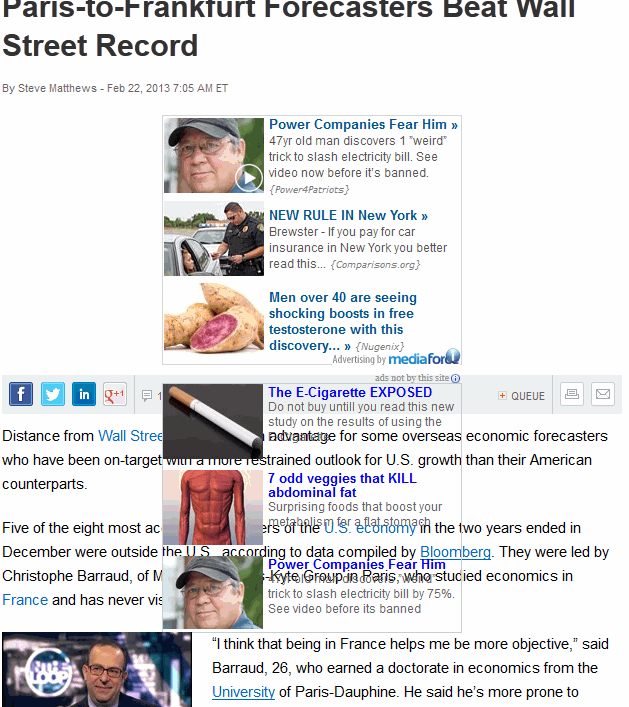
Ok, restarting in safemode prevented the problem. Now how do I pinpoint which addon is causing the problem?
If it works in Firefox Safe-mode then disable all extensions (Tools > Add-ons > Extensions) and then try to find which is causing it by enabling one extension at a time until the problem reappears.
Close and restart Firefox after each change via "File > Exit" (Mac: "Firefox > Quit"; Linux: "File > Quit")
If you use extensions (Tools > Add-ons > Extensions) like Adblock Plus or NoScript or Flash Block that can block content then make sure that such extensions aren't blocking content.
I don't use Adblock Plus, NoScript or Flash Block but I'll try disabling and reenabling 1 at a time and let you know which one was the culprit.
Thanks for the quick responses!