


X
Tap here to go to the mobile version of the site.

Support Forum

"This Connection is Untrusted" message started appearing alot.

Posted

I started getting this message a while ago. It does not only appear with youtube.com i remember that it also appeared with google.com and probably some other websites. Not on all secure connections (https)

Message,

This Connection is Untrusted

"You have asked Firefox to connect securely to youtube.com, but we can't confirm that your connection is secure."

"youtube.com uses an invalid security certificate.

The certificate is not trusted because it was issued by an invalid CA certificate.

(Error code: sec_error_inadequate_key_usage)"

http://img600.imageshack.us/img600/6679/capturegro.png

Helpful replies

when you get the sec_error_untrusted_issuer error on youtube.com & you attempt to add an exception & view the certificate - which issuer name/organisation is displayed there?
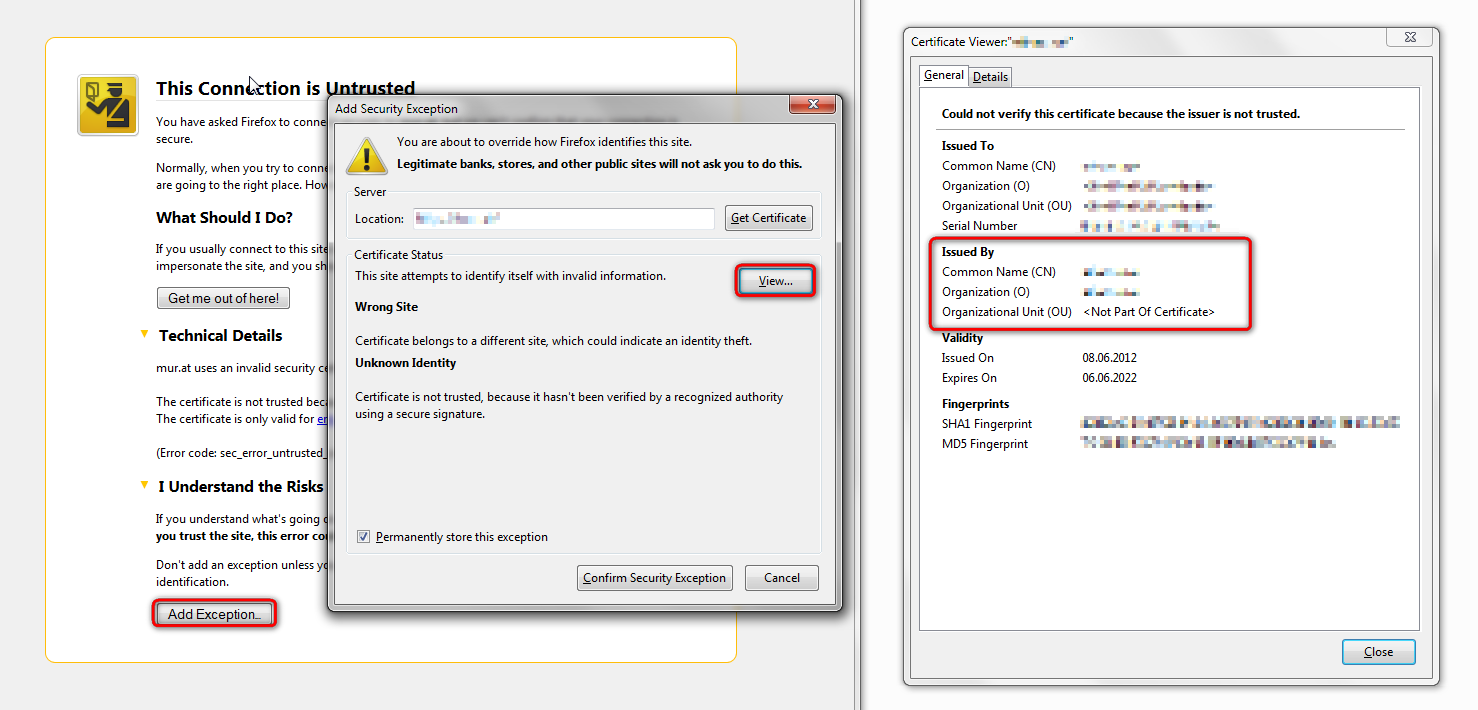
Go to answer 2

please try disabling ssl scan in kaspersky: http://support.kaspersky.com/6851

Go to answer 4
Post a Reply

Additional System Details

Installed Plug-ins

  • Google Update
  • Next Generation Java Plug-in 10.13.2 for Mozilla browsers
  • NPRuntime Script Plug-in Library for Java(TM) Deploy
  • DivX Plus Web Player version 2.2.2.14
  • Shockwave Flash 11.5 r502
  • Adobe PDF Plug-In For Firefox and Netscape 11.0.01
  • 2.1.2
  • GEPlugin
  • 0.70.4
  • The plug-in allows you to open and edit files using Microsoft Office applications
  • Office Authorization plug-in for NPAPI browsers

Application

  • User Agent: Mozilla/5.0 (Windows NT 6.2; WOW64; rv:18.0) Gecko/20100101 Firefox/18.0

More Information

philipp
  • Top 10 Contributor
918 solutions 4615 answers
Posted

hello, maybe you can solve it by deleting the file in your profile folder that holds the certificates. go to firefox > help > troubleshooting information and click on profile folder/show folder. a windows explorer window should open up - in there delete the file named cert8.db & restart firefox afterwards (the file will be regenerated).

Was this helpful to you? 4
Reply
Posted

Question owner

The file was regenerated. But after doing that if i try to open anything i get an error. But this time it is . (Error code: sec_error_untrusted_issuer)

So , I removed the newly generated file and got back the old one.

Was this helpful to you? 0
Reply
philipp
  • Top 10 Contributor
918 solutions 4615 answers
Posted

Helpful Reply

when you get the sec_error_untrusted_issuer error on youtube.com & you attempt to add an exception & view the certificate - which issuer name/organisation is displayed there?

Was this helpful to you? 2
Reply
Posted

Question owner

I did not try to add an exception.

Was this helpful to you? 0
Reply
philipp
  • Top 10 Contributor
918 solutions 4615 answers
Posted

yes this is just intended for further diagnosing the issue - what is listed there when you try once?

Was this helpful to you? 0
Reply
Posted

Question owner

Issued by Kaspersky

Was this helpful to you? 1
Reply
philipp
  • Top 10 Contributor
918 solutions 4615 answers
Posted

Helpful Reply

please try disabling ssl scan in kaspersky: http://support.kaspersky.com/6851

Was this helpful to you? 4
Reply
Posted

Question owner

Worked. Thanks!

Was this helpful to you? 1
Reply

Post a Reply

You must log in to your account to reply to posts.

Don't have an account? You can create a free account now.
