


X
Tap here to go to the mobile version of the site.

Support Forum

Firefox Deleted all my passwords and won't prompt to save passwords anymore

Posted

About a week or so ago, for some reason all my saved passwords were deleted from firefox. When trying to re-enter them, I noticed that no matter what site I tried, I never got prompted to save them anymore. It's not an issue with add-ons because I haven't added on an extension in months. I've tried all suggestions even upgrading to the 19.0 beta and nothing has worked.

Helpful replies

It is possible that there is a problem with the key3.db and signons.sqlite files that store the encrypted names and passwords in Firefox.
Rename the key3.db and signons.sqlite files in the Firefox profile folder.
You can add .old to the file names (key3.db.old and signons.sqlite.old) or move them to another folder to make it possible to undo the action.
You need to set a new Master Password after renaming or deleting key3.db and all currently saved passwords are lost.
If that has worked then you can remove the renamed files that are no longer needed.

See:

Go to answer 1
Post a Reply

Additional System Details

Installed Plug-ins

  • Google Talk Plugin Video Accelerator version:0.1.44.23
  • Version 3.13.1.11376
  • Shockwave Flash 11.5 r502
  • RealPlayer(tm) LiveConnect-Enabled Plug-In
  • RealPlayer Download Plugin
  • Adobe PDF Plug-In For Firefox and Netscape 11.0.01
  • Google Update
  • RealNetworks(tm) RealDownloader Chrome Background Extension Plug-In
  • RealNetworks(tm) RealDownloader PepperFlashVideoShim Plug-In
  • RealNetworks(tm) RealDownloader HTML5VideoShim Plug-In
  • RealDownloader Plugin
  • Next Generation Java Plug-in 1.6.0_38 for Mozilla browsers
  • NPRuntime Script Plug-in Library for Java(TM) Deploy
  • The QuickTime Plugin allows you to view a wide variety of multimedia content in Web pages. For more information, visit the QuickTime Web site.
  • iTunes Detector Plug-in
  • GEPlugin
  • 5.1.10411.0
  • The plug-in allows you to open and edit files using Microsoft Office applications
  • Office Authorization plug-in for NPAPI browsers
  • The Hulu Desktop Plugin allows Hulu.com to integrate with the Hulu Desktop application.
  • NPWLPG
  • Adobe Shockwave for Director Netscape plug-in, version 11.5

Application

  • User Agent: Mozilla/5.0 (Windows NT 6.1; WOW64; rv:19.0) Gecko/20100101 Firefox/19.0

More Information

roshan4074 0 solutions 7 answers
Posted

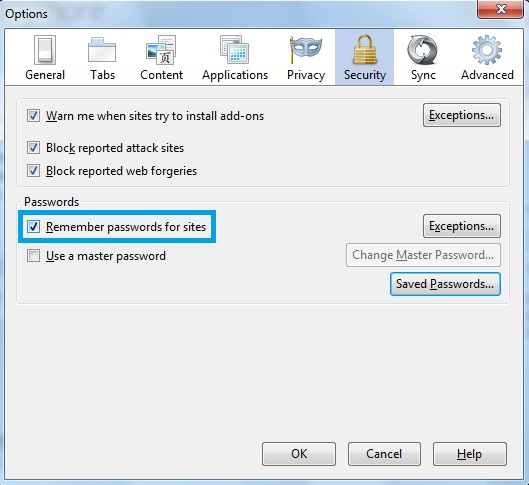
As you have mentioned that you have tried all suggestions, I would like to confirm if you have performed the following steps:

  1. Click to Tools tab located at the top in Firefox window
  2. Click on Options
  3. Click on Security tab
  4. In the Passwords panel check mark the check box Remember passwords for sites
  5. Click on OK

Please verify and let us know the result.
Was this helpful to you? 1
Reply
cor-el
  • Top 10 Contributor
  • Moderator
8288 solutions 78442 answers
Posted

Helpful Reply

It is possible that there is a problem with the key3.db and signons.sqlite files that store the encrypted names and passwords in Firefox.
Rename the key3.db and signons.sqlite files in the Firefox profile folder.
You can add .old to the file names (key3.db.old and signons.sqlite.old) or move them to another folder to make it possible to undo the action.
You need to set a new Master Password after renaming or deleting key3.db and all currently saved passwords are lost.
If that has worked then you can remove the renamed files that are no longer needed.

See:

Was this helpful to you? 1
Reply
Posted

Question owner

Funny how life works sometimes. The day after I posted this topic, my passwords came back and it's prompting me to save them again. Have no idea how or why.

Thanks anyways guys.

Was this helpful to you?
Reply

Post a Reply

You must log in to your account to reply to posts.

Don't have an account? You can create a free account now.