

when I click a bookmark it opens in the bookmark side bar, not in the main window.
I want a selected bookmark to open in the main browser window when I click it (as it has always done before)
Chosen solution
by TheOldFoxBookmarks that open in the side bar is the default for bookmarks that are created via a link or button on a website to add a bookmark for that site.
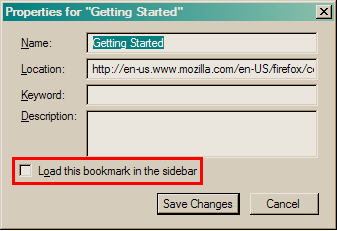
- Check the Properties of a bookmark via the right-click context menu in the side bar (Ctrl+B; Cmd+B on Mac).
- In the Bookmarks Manager (Bookmarks > Show All Bookmarks) you can click the More button in the Details pane at the bottom right.
- Make sure that "Load this bookmark in the side bar" is not selected (un-check it).
Additional System Details
Installed Plug-ins
- Shockwave Flash 11.5 r502
- Displays Java applet content, or a placeholder if Java is not installed.
- The QuickTime Plugin allows you to view a wide variety of multimedia content in web pages. For more information, visit the QuickTime Web site.
- The Flip4Mac WMV Plugin allows you to view Windows Media content using QuickTime.
- The Google Earth Plugin allows you to view 3D imagery and terrain in your web browser.
- Reader Library Helper Plugin
Application
- Firefox 19.0
- User Agent: Mozilla/5.0 (Macintosh; Intel Mac OS X 10.6; rv:19.0) Gecko/20100101 Firefox/19.0
- Support URL: http://support.mozilla.org/1/firefox/19.0/Darwin/en-US/
Extensions
- Adblock Plus 2.2.1
- Autofill Forms 0.9.9.0
- British English Dictionary 1.19.1
- DownloadHelper 4.9.13
- PDF Viewer 0.7.1
- DownThemAll! 2.0.15 (Inactive)
- FireFTP 2.0.7 (Inactive)
- Personas 1.6.2 (Inactive)
- QuickJava 1.8.0 (Inactive)
- SearchPreview 6.1 (Inactive)
- Status-4-Evar 2012.07.08.17 (Inactive)
- Tab Mix Plus 0.4.0.4 (Inactive)
- Test Pilot 1.2.2 (Inactive)
Javascript
- incrementalGCEnabled: True
Graphics
- adapterDescription:
- adapterDeviceID: 0x 863
- adapterDrivers:
- adapterRAM:
- adapterVendorID: 0x10de
- driverDate:
- driverVersion:
- info: {u'AzureContentBackend': u'none', u'AzureCanvasBackend': u'quartz', u'AzureFallbackCanvasBackend': u'none'}
- numAcceleratedWindows: 1
- numTotalWindows: 1
- webglRenderer: NVIDIA Corporation -- NVIDIA GeForce 9400M OpenGL Engine
- windowLayerManagerType: OpenGL
Modified Preferences
- accessibility.typeaheadfind.flashBar: 0
- browser.cache.disk.capacity: 358400
- browser.cache.disk.smart_size.first_run: False
- browser.cache.disk.smart_size.use_old_max: False
- browser.cache.disk.smart_size_cached_value: 358400
- browser.places.smartBookmarksVersion: 4
- browser.startup.homepage: http://www.netvibes.com/privatepage/1#General
- browser.startup.homepage_override.buildID: 20130123083802
- browser.startup.homepage_override.mstone: 19.0
- browser.tabs.loadInBackground: False
- browser.tabs.onTop: False
- dom.event.contextmenu.enabled: False
- dom.mozApps.used: True
- extensions.lastAppVersion: 19.0
- gfx.blacklist.webgl.msaa: 4
- network.cookie.prefsMigrated: True
- places.database.lastMaintenance: 1359325257
- places.history.expiration.transient_current_max_pages: 104858
- privacy.cpd.cache: False
- privacy.cpd.cookies: False
- privacy.cpd.formdata: False
- privacy.cpd.sessions: False
- privacy.donottrackheader.enabled: True
- privacy.sanitize.migrateFx3Prefs: True
- privacy.sanitize.timeSpan: 0
- security.warn_viewing_mixed: False
Misc
- User JS: No
- Accessibility: No
Chosen Solution
Bookmarks that open in the side bar is the default for bookmarks that are created via a link or button on a website to add a bookmark for that site.
- Check the Properties of a bookmark via the right-click context menu in the side bar (Ctrl+B; Cmd+B on Mac).
- In the Bookmarks Manager (Bookmarks > Show All Bookmarks) you can click the More button in the Details pane at the bottom right.
- Make sure that "Load this bookmark in the side bar" is not selected (un-check it).
Solution chosen
Question owner
With your help I have solved the problem. Thank you.
