


Why is Firefox on Android so large? It uses 20-60MB and fills up the volume? (App: 24MB. Data: 30MB+)

Summary:
Firefox is using too much space on my Android phone and this is causing problems on my phone such as "Low on space" errors. Android applications are unable to receive security updates due to Firefox's high space utilization, which is a security problem.
Why does Firefox use so much space and how can I prevent or resolve this problem?
Details:
I am running Firefox 18.0 on Android 2.3.4. I moved Firefox to my 8GB SD Card. This problem happens in Firefox 19 & Firefox 20 as well.
Firefox is using a huge amount of space. It is the largest application on my phone by a long shot. It seems that Firefox will grow without bounds until it triggers a "Low on space" warning on the Android device. When this "Low on space" warning is reached, Firefox becomes unstable, and I am unable to install other Android applications. Often applications are unable to update themselves due to Firefox's high space utilization, and cannot receive security updates which is a security problem.
Please see the following screenshot which shows that Firefox is using about 30MB worth of space, and is about twice as large as the next largest App, Google Maps.
https://www.dropbox.com/sh/7di3oh1p98bh68v/AoxNuqMKd4/2013.01.20-16.17.40.jpeg
If I go to "Settings: Applications: Storage Use: Firefox", Android tells me that Firefox is using the following amount of space:
   Storage:
   Total: 29.60Mb
   Application: 1.85MB
   Data: 27.76MB
Cache: 0.00B
When Firefox is freshly installed, the "Total:" use is closer to 3MB. But within a few days, this number grows to 30MB.
Why does Firefox use so much space and how can I prevent or resolve this problem?
Modified by user469307
Chosen Solution
Thanks for pointing out the option for `browser.cache.disk.parent_directory`. I understand the privacy implications of storing the cache outside the profile directory, but I don't have much choice. Firefox as an App grew quite a bit with the latest release (8MB worth of fonts) and my phone was so full that the system wasn't applying security updates to other Apps. I either need to get this disk space problem resolved or I will have to stop using Firefox.
I did this to free up space:
- Created a new directory on my sdcard (`/mnt/sdcard/something/`)
- Under `about:config` set browser.cache.disk.parent_directory to match the new directory created above.
- Restart Firefox (I had to kill the Firefox app)
- Went to a few cache-heavy websites like Facebook and Pinterest
- Verified that the cache was working under `about:cache`
- Deleted the old cache files under my foo.profile/Cache directory
- Went to `about:config` and reverted a few of my manual settings which I set months ago to conserve disk space.
Now Firefox uses 10MB less space on my system memory then it did before. I can also make the cache larger (much larger) which will speed up the viewing of webpages.
I could not create a symlink from my old Cache directory to the new Cache directory.
More info about ` browser.cache.disk.parent_directory` can be found at http://kb.mozillazine.org/Browser.cache.disk.parent_directory
Modified by user469307
All Replies (20)

Firefox for Android is a full replacement for a browser. It is a similar size to the Chrome browser available for ICS+. Thirty megs is about the minimum that Firefox will use.
When I install Firefox and move it to the SD card, the app only uses a few Megabytes worth of space (See the screenshot above to show the space, according to Android). Firefox functions fine. But eventually Firefox grows to be much larger.
Modified by user469307
The installer is approximately 20 megs. There is no way for Firefox to use less than that.
Stefan have you moved yor FF to SD card? Application takes very little of space but data takes a lot. I`ve got similar problem - 32 MB of data - my Sync account takes 6,6....
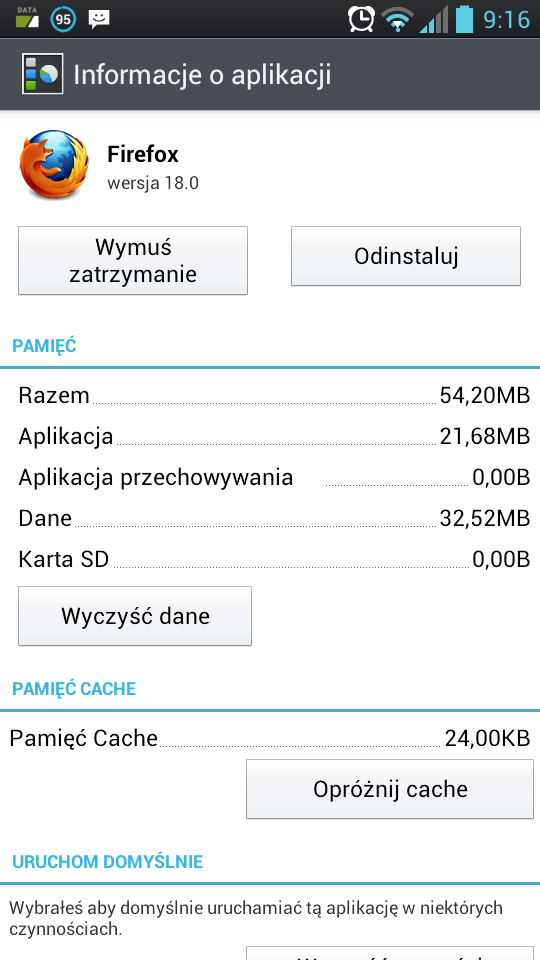
Yes, I have moved Firefox to the SD card. According to Android, Firefox only uses 1.85MB on the main system storage.
Application: 1.85MB
I'll update my question to state that Firefox has been moved to the SD card.
> The installer is approximately 20 megs
But note that according to Android, Firefox only uses 1.85MB on my system:
      Application: 1.85MB
      Data: 27.76MB
I should clarify that I moved Firefox to the SD card. The bulk of the 20MB application lives on the SD card. But Data grows from a few MB to 30+ MB within a few days.
Modified by user469307
That's what i thought Stefan. I cannot move my apps to SD, so now i`ve got firefox with ober 80 MBs on my phones memory!
So i`ve check it and i found something interesting: Folder /data/data/org.mozilla.firefox/files/mozilla/wl5xm96h.defult/Cache takes 43.31 MB! So why cache folder takes 43MB??
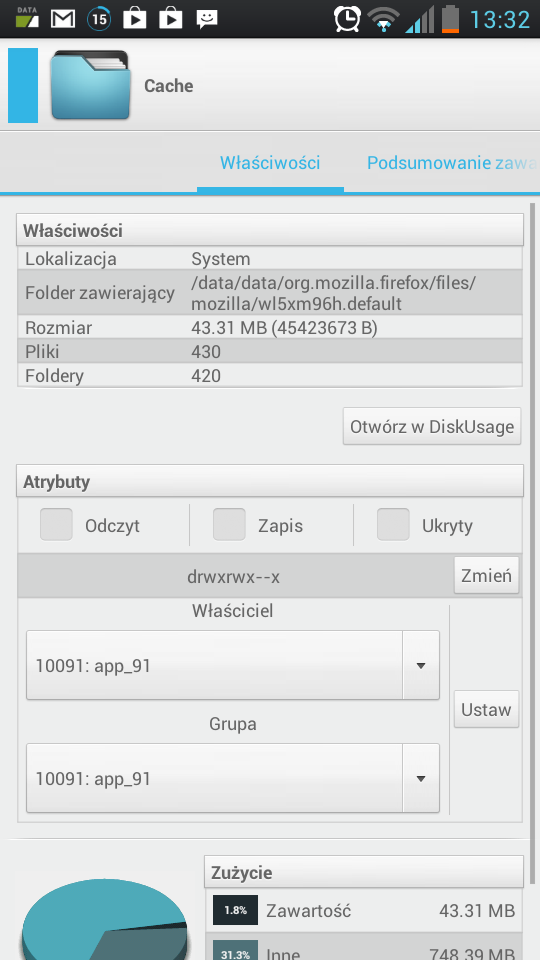
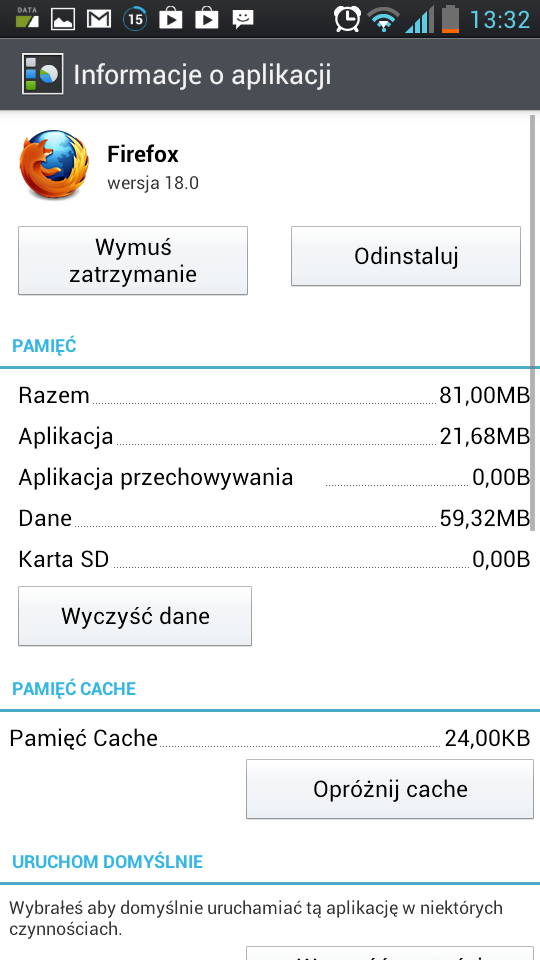
Olaf, I have come to the same conclusions. The Cache is at fault here.
The four largest directories under /data/data/org.mozilla.firefox are:
   1MB    	./files/mozilla/$uniqueid.default/indexedDB/chrome
   1MB    	./files/mozilla/$uniqueid.default/indexedDB
   3MB    	./files/mozilla/$uniqueid.default/safebrowsing
   5-30MB	./files/mozilla/$uniqueid.default/Cache
(Note that I obfuscated my unique identifier)
I've been reading up on the Cache settings (browse to about:config and search for 'cache'), but some of those settings are not well documented.
Also note that Android's "Clear Cache" does not work with the Firefox cache.
Modified by user469307
I have a more detailed analysis of the problem. I believe this is a bug in Firefox, and I will file a bug report later. Look below for my temporary workaround.
Firefox has a feature known as a "Smart cache". I cannot find much information about this cache, but the name suggests that the size of the "Smart cache" is determined automatically.
To see the value of your cache, browse to "about:cache" and note the values. For me, "Maximum storage size" is currently 256000 KiB (Yes -- 200MiB). This value is equal to the value of browser.cache.disk.capacity, which was modified by Firefox from it's default value of 20480.
   Disk cache device
   Number of entries:     321
   Maximum storage size:     256000 KiB
   Storage in use:     2561 KiB
   Cache Directory:     /data/data/org.mozilla.firefox/files/mozilla/removed.default/Cache
   List Cache Entries
My workaround
Here is my temporary workaround to adjust the size of the cache. I am experimenting with these settings, but I feel these settings are okay for my low-end Android phone.
Go to 'about:cache', search for 'cache' and then change the following values
- Disable the smart cache:
browser.cache.disk.smart_size.enabled=false
- Set the disk cache to a small value. This might be too small in the eyes of some developers, and I am open to better values. The default is 20480 (20M) which is way too large for my phone.
browser.cache.disk.capacity=2048
- Cache compression is disabled by default. Turn it on, and set compression to a reasonable level (1-9, where 1 is low CPU usage but low compression, and 9 is high CPU usage and high compression).
browser.cache.compression_level=6
Verify
1. Browse to 'about:cache' and note that the new value for ' Maximum storage size' is 2048.
Another culprit is webappsstore.sqlite*, which on my phone uses 10MB worth of space. See below (I included the 5 largest subdirectories for comparison).
   # pwd
   /data/data/org.mozilla.firefox/files/mozilla/foo.default
   # du -ks * | sort -n
   ...
   1049    startupCache
   3549    safebrowsing
   4096    webappsstore.sqlite
   6072    adblockplus
   6149    webappsstore.sqlite-wal
   #
   # du -ks /data/data/org.mozilla.firefox/files/mozilla*
   34777   /data/data/org.mozilla.firefox/files/mozilla
This is marked as a bug, but I don't know if there is any workaround or solution for this.
Modified by user469307
And, if I move Firefox from the SD Card back to the Phone memory, Firefox 20 uses 62MB of space:
Here are two screenshots:
https://www.dropbox.com/s/qzecjr93z67zpw1/shot_000003.png https://www.dropbox.com/s/d6731nvgh3wueyj/shot_000004.png
I was regularly Firefox's Clear Data and Cache from the Application manager. Since Link2SD won't move the data files to sdcard, I had to do it manually. but first the device must be rooted and busybox is installed on the device.
now I moved the files and cache directory from /data/data/org.mozilla.firefox to my sdcard's second partition. The /data/data/org.mozilla.firefox directory now has less than 2 MB, and it is stable in that size

This is a great tip, and I've been looking for something like that for some time.
I would only add that you could also specify where to store the cache files using the browser.cache.disk.parent_directory property, for example, to use external storage.
Please, note that this property is not there for a good reason (you'll have to add it manually). Putting your Cache data in a removable device is not a good idea, as it can easily been extracted, and copied elsewhere, compromising your privacy and security. But if you keep your smartphone with you all the time, then you can assume the risk of trading for a small amount of valuable internal storage space.
Chosen Solution
Thanks for pointing out the option for `browser.cache.disk.parent_directory`. I understand the privacy implications of storing the cache outside the profile directory, but I don't have much choice. Firefox as an App grew quite a bit with the latest release (8MB worth of fonts) and my phone was so full that the system wasn't applying security updates to other Apps. I either need to get this disk space problem resolved or I will have to stop using Firefox.
I did this to free up space:
- Created a new directory on my sdcard (`/mnt/sdcard/something/`)
- Under `about:config` set browser.cache.disk.parent_directory to match the new directory created above.
- Restart Firefox (I had to kill the Firefox app)
- Went to a few cache-heavy websites like Facebook and Pinterest
- Verified that the cache was working under `about:cache`
- Deleted the old cache files under my foo.profile/Cache directory
- Went to `about:config` and reverted a few of my manual settings which I set months ago to conserve disk space.
Now Firefox uses 10MB less space on my system memory then it did before. I can also make the cache larger (much larger) which will speed up the viewing of webpages.
I could not create a symlink from my old Cache directory to the new Cache directory.
More info about ` browser.cache.disk.parent_directory` can be found at http://kb.mozillazine.org/Browser.cache.disk.parent_directory
Modified by user469307
I requested that the Developers allow us to move the 8MB worth of fonts from internal storage to the SD Card:
I found that the Safebrowsing database uses between 4-8MB of space. See bug https://bugzilla.mozilla.org/show_bug.cgi?id=886131 . If Firefox crashes often, then Safebrowsing might use 8MB until it refreshes the database. A user can disable the safebrowsing feature via about:config and then delete the safebrowsing files (requires root) to save another 4-8MB of space.
More info on the Safebrowsing database at https://support.mozilla.org/en-US/kb/how-does-firefox-android-provide-secure-mobile-bro#w_phishing-and-malware-protection
Modified by user469307
This is a great tip, and I've been looking for something like that for some time.
I would only add that you could also specify where to store the cache files using the browser.cache.disk.parent_directory property, for example, to use external storage.
Please, note that this property is not there for a good reason (you'll have to add it manually). Putting your Cache data in a removable device is not a good idea, as it can easily been extracted, and copied elsewhere, compromising your privacy and security. But if you keep your smartphone with you all the time, then you can assume the risk of trading for a small amount of valuable internal storage space. 'Get Android Phone Android Phone'


So, I don't get it. If I go to the App info page for Firefox on my Android (HTC EVO 3D), it has a button: "Move to phone", which implies that FF is installed on my SD card, but the stats say:
- Total: 123MB
- App: 2.45MB
- USB storage app: 25.44MB
- Data: 94.86MB
- SD card 0.00B
- Cache: 0.00B
- If FF is installed on the SD card, why does this say it takes up 0.00B? (Not even a fraction of a byte!)
- What is the 94.86MB of Data? I don't want to (and am not sure how to) delete it blindly.
- What is the USB storage app of 25.44MB?
My Internal memory have only 150MB left out of 2GB. Firefox is the biggest app, by far. This is too little space to (1) install new apps, and (2) update many existing apps! I have a 64GB SD card with 32GB free! Surely some/most/all of FF could live on the SD card, where there is over 200 times as much space available! What makes the internal memory more secure?
Modified by Chelmite
@Chelmite, I think the way Android reports usage is a bit confusing. I think that "USB storage app" is the space the Firefox "Application" takes on the SD card. "App" is the space it still takes from the internal storage after it's been moved to SD (if you move it back to Phone, you'll notice it grows again to nearly 30MB).
Data is actually everything that Firefox uses or creates for your user profile, settings, and even cookies and cached pages which by default are not stored on SD card (even if the App itself has been moved to it) because of a simple security reason: If someone takes your device, they may easily remove the SD card and access sensitive data such as cookies or cached pages without even having to unlock your phone!
Firefox Cache doesn't use the Android convention for storing the cached info in an accessible way that is easily cleaned up from Android's UI. Instead you'll need to clear Firefox cache from its in-app Settings / Clear Private Data option. That's also why all cached web pages sum up into the Data field instead of the Cache field.
If you've read all this thread, early on we talked about a possibility of compromising your privacy and security, and possibly performance, in favor of a few megabytes of internal storage by having Firefox to store its cache on the SD card. I do not recommend this unless you are an advanced user, and you really understand the risks.
As a Firefox user on everything but my phone... including desktop Windows, Linux, and Nexus 7 tablet... I really think there should be an easier way to get these solutions working on my cheap phone. Like others, my phone only has 250MB of internal storage, and I'm aware there's risks involved in storing data on SD, but otherwise FF is unusable.
I instead use Opera Mobile (now Opera Mobile Classic), which is great and only uses about 4.5MB total if app is moved to SD without changing any settings. But I would prefer to use FF due to syncing.