


Does not display properly: much of space is white without text, etc.

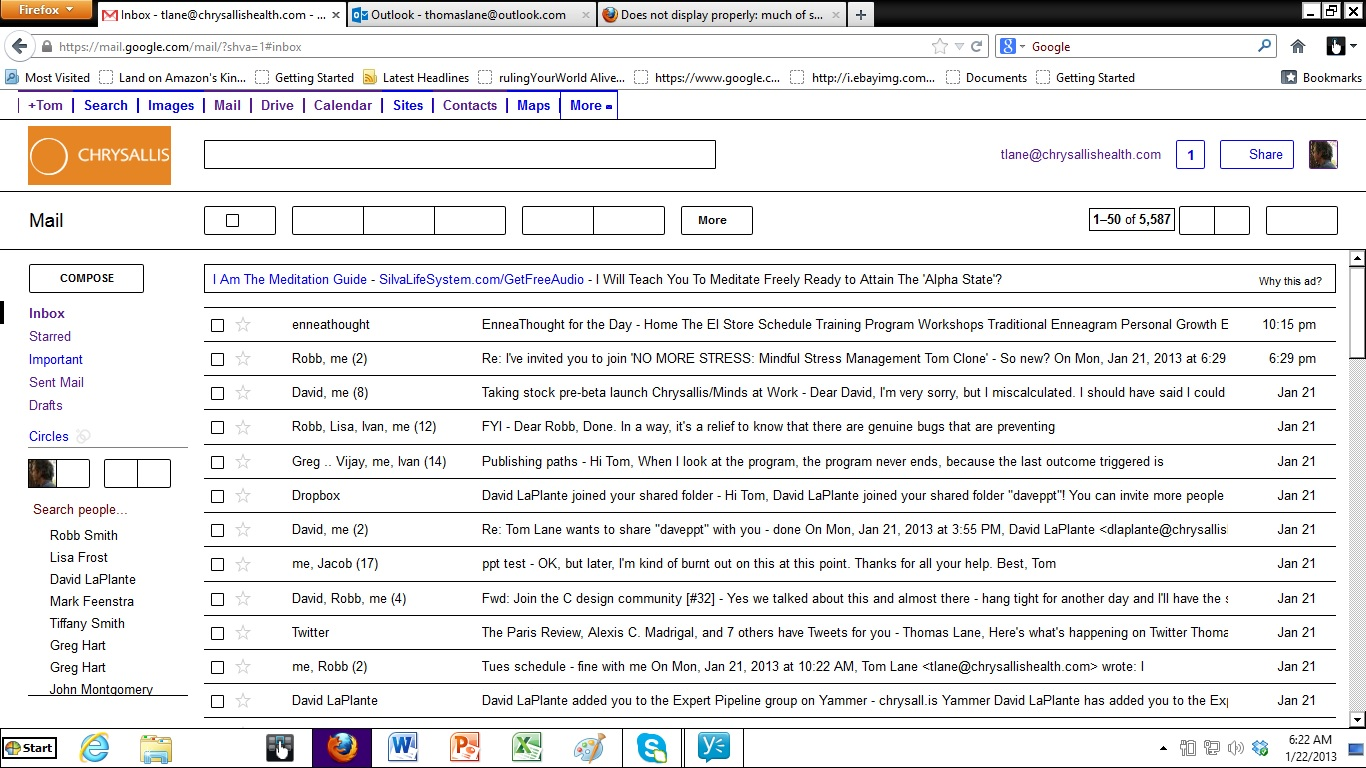
Using Firefox on new laptop (HP Envy m6), synched to Firefox on old laptop. Much information doesn't display:
In Google mail, check-marks don't show, everything except text is white, and text doesn't appear on a lot of buttons. In Google drive, can see text but can't see colors outlining text. I'd like to post a screenshot but not sure how to do that.
All Replies (4)

Please create a screenshot of the problem you're seeing by following the guide mentioned at How do I create a screenshot of my problem?.
Once you've done this, attach the saved screenshot file to your forum post by clicking the Browse... button below the Post your reply box. This will help us to visualize the problem. _______________________________________________________________________________________________
Make sure you didn't Zoom the webpages.
Ctrl+0 -> Normal View.
Modified by iamjayakumars
Make sure that you haven't enabled a High Contrast theme in the Windows Accessibility settings and that you allow pages to choose their colors in Firefox.
- Tools > Options > Content : Fonts & Colors > Colors : [X] "Allow pages to choose their own colors, instead of my selections above"
Thanks so much. Here is the screenshot.This is of my Google mail page. I already checked the solution the other person kindly gave, and that does not seem to be the problem.
Did you check the Firefox setting and the Windows setting?
- Tools > Options > Content : Fonts & Colors > Colors : [X] "Allow pages to choose their own colors, instead of my selections above"